Tutoriál 3 — Quest
V tomto tutoriálu si postavíš malé RPG s pohledem shora: projdeš mapu větší než obrazovka, posbíráš mince, promluvíš s NPC, porazíš slizy a splníš jednoduchý úkol. Předpokládáme, že už máš za sebou 01-bounce a 02-starship. Hlavními novinkami jsou kamera a použití dlaždicové mapy jako herního světa.
Celý zdrojový kód najdeš na GitHubu.
Spuštění libovolného kroku:
python3 sim/run.py tutorials/03-quest/stepN_name.py --hold DOWN --shot /tmp/out.pngTip: pokud chceš ovládat dialog a projít úkol v krocích 6–8, spusť simulátor s
--backend pygame.
Krok 1 — step1_world.py · svět větší než obrazovka
Sekce “Krok 1 — step1_world.py · svět větší než obrazovka”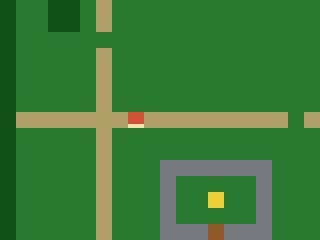
picogame_game.setup(...) vrátí (scene, buffer_a, buffer_b).
U SPI displeje jsou poslední dvě hodnoty znovu použitelné řádkové buffery, u framebufferu
mají hodnotu None. První kroky potřebují jen Scene, takže zbývající
hodnoty zahodí (scene, _, _). Pozdější dialogové kroky předají buffer_a pomocné funkci
pro okamžité vykreslení; framebuffer jej nepotřebuje.
ASCII mapa se převede na Tilemap o rozměru 30×20 dlaždic, tedy 480×320
pixelů. To je víc než obrazovka s rozlišením 320×240. shp.tileset_colors vytvoří sadu
dlaždic pro trávu, cestu, vodu, strom, zeď, dveře a cíl. Hrdinu zatím představuje červený
čtverec se světlejší hranou na straně, ke které je otočený. V kroku 4 jej nahradíme
postavou z ASCII masek.
scene.set_view(offset_x, offset_y) vybírá viditelný výřez světa, a plní
tak roli kamery. Hrdina používá souřadnice herního světa; posun pohledu určuje jeho místo
na obrazovce. Uvidíš: část světa s hrdinou uprostřed. Zkus: uprav řádky v MAP.
# Quest -- step 1: a world bigger than the screen.## This third tutorial builds a top-down RPG. It teaches what Bounce and Starship# couldn't: a scrolling world larger than the display, a camera that follows the# hero, tile-based wall collision, a walk animation, items, an NPC you talk to, and# light combat. Do 01-bounce and 02-starship first.## What you learn here: a Tilemap can be a whole WORLD (30x20 tiles = 480x320 px,# bigger than the 320x240 screen). scene.set_view(offset_x, offset_y) chooses which part of the# world is on screen -- that's the camera. We centre it on the hero. The hero lives# in WORLD coordinates; the view offset decides where that lands on screen.## New: a large Tilemap from an ASCII map, shp.tileset_colors, scene.set_view, and a# placeholder hero (a red square with a facing edge). Step 4 gives it real drawn art.## Run:  python3 sim/run.py tutorials/03-quest/step1_world.py --shot /tmp/q1.png
import arrayimport picogame as pgimport picogame_gameimport picogame_clockimport picogame_shapes as shp
W, H = picogame_game.screen()   # never hardcode: the same game runs at 240x240 and 640x480TILE = 1638 collapsed lines
# . grass  : path  ~ water(solid)  # tree(solid)  W wall(solid)  D door  G goal# P player  N npc  * coin  E enemyMAP = [    "##############################",    "#.....:......................#",    "#.....:........*.............#",    "#..##.:.............~~~~~~...#",    "#..##.:.............~~~~~~...#",    "#.....N.............~~~~~~...#",    "#.....:.......E.....~~~~~~...#",    "#.....:......................#",    "#.....:.....*.........*......#",    "#.....:......................#",    "#:::::::P:::::::::*::::::::::#",    "#.....:...................*..#",    "#.....:.............E........#",    "#.....:...WWWWWWW............#",    "#.....:...W.....W......##....#",    "#.....:.*.W..G..W......##....#",    "#.....:...W.....W........E...#",    "#.....:...WWWDWWW............#",    "#.....:......................#",    "##############################",]MAPCOLS, MAPROWS = 30, 20# map char -> tile value (entities sit on grass; the tile under them is grass/path)# tile values (frame index into the colour tileset; 0 = empty)GRASS, PATH, WATER, TREE, WALL, DOOR, GOAL = 1, 2, 3, 4, 5, 6, 7CHAR2TILE = {".": GRASS, "P": GRASS, "N": GRASS, "*": GRASS, "E": GRASS,             ":": PATH, "~": WATER, "#": TREE, "W": WALL, "D": DOOR, "G": GOAL}# tile colours for values 1..7 (value 0 is unused)TILE_RGB = [(40, 120, 50),    # GRASS            (180, 160, 110),  # PATH            (40, 90, 200),    # WATER            (20, 80, 30),     # TREE            (120, 120, 130),  # WALL            (150, 90, 40),    # DOOR            (240, 210, 60)]   # GOAL
scene, _, _ = picogame_game.setup(background=pg.rgb565(0, 0, 0))clock = picogame_clock.Clock(30)
tileset = shp.tileset_colors(TILE, TILE, [pg.rgb565(*color) for color in TILE_RGB])world = pg.Tilemap(tileset, MAPCOLS, MAPROWS)hero_x, hero_y = TILE, TILE                   # world pixel position of the hero# build the Tilemap cell by cell from the ASCII map abovefor tile_y in range(MAPROWS):    row = MAP[tile_y]    for tile_x in range(MAPCOLS):        char = row[tile_x] if tile_x < len(row) else "."   # rows are full width; "." is just a safety net        world.set_tile(tile_x, tile_y, CHAR2TILE.get(char, GRASS))   # unknown chars fall back to GRASS        if char == "P":            hero_x, hero_y = tile_x * TILE, tile_y * TILEscene.add(world)

# a PLACEHOLDER hero: a plain red square with a brighter bar on the facing edge, so you# can see which way it points. 4 frames = 4 directions (frame = facing). We prototype# with a shape now and draw a real animated character in step 4.RED = pg.rgb565(210, 80, 60)EDGE = pg.rgb565(255, 225, 170)

def hero_bitmap():    palette = array.array("H", [pg.rgb565(0, 0, 0), RED, EDGE])   # index 0 = transparent    stride = TILE * 4                                             # 4 frames side by side, 1 byte/px    data = bytearray(stride * TILE)    for facing in range(4):                                       # 0 down, 1 up, 2 left, 3 right        for y in range(TILE):            for x in range(TILE):                on_facing_edge = ((facing == 0 and y >= TILE - 3) or (facing == 1 and y < 3) or                                  (facing == 2 and x < 3) or (facing == 3 and x >= TILE - 3))                data[y * stride + facing * TILE + x] = 2 if on_facing_edge else 1    return pg.Bitmap(data, TILE, TILE, format=pg.PAL8, palette=palette, frames=4, stride=stride)

hero = pg.Sprite(hero_bitmap(), hero_x, hero_y, frame=0)scene.add(hero)

def camera_follow():    # centre the camera on the hero, clamped so we never show past the world edges    # The view offset = how far the world is shifted left/up on screen: 0 (world edge    # at screen edge) down to negative as we scroll right/down.    offset_x = W // 2 - (hero.x + TILE // 2)          # centre the hero...    offset_x = min(0, offset_x)                       # ...but never past the left edge    offset_x = max(W - MAPCOLS * TILE, offset_x)      # ...nor past the right edge    offset_y = H // 2 - (hero.y + TILE // 2)          # centre the hero...    offset_y = min(0, offset_y)                       # ...but never past the top edge    offset_y = max(H - MAPROWS * TILE, offset_y)      # ...nor past the bottom edge    scene.set_view(int(offset_x), int(offset_y))

camera_follow()while True: scene.refresh() clock.tick()Krok 2 — step2_walk.py · chůze a sledující kamera
Sekce “Krok 2 — step2_walk.py · chůze a sledující kamera”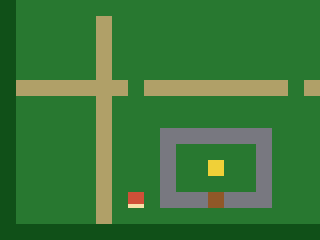 Směr pohybu čteme přes
 picogame_input. Po každém kroku funkce
camera_follow() znovu vycentruje kameru a omezí její posun tak, aby nebylo vidět za
okraje světa. U okraje proto hrdina pokračuje směrem k okraji obrazovky, zatímco kamera
už stojí. Hodnota frame vybírá směr dolů, nahoru, doleva nebo doprava. Kolize se zdmi
zatím chybí, takže můžeš chodit i po vodě. Uvidíš: hrdinu, kterého kamera sleduje v
mezích mapy. Zkus: změň SPEED.
14 collapsed lines
# Quest -- step 2: walk around, camera follows.## What you learn: world vs screen coordinates. The hero moves in WORLD space; after# each move we call camera_follow() to re-aim the camera. Near the world edges the clamp in# camera_follow() stops the camera and the hero walks toward the screen edge instead -- the# classic top-down feel. The hero also FACES the way it moves -- its `frame` picks the# direction (0 down, 1 up, 2 left, 3 right). There's no wall collision yet, so you can# walk over water and trees (step 3 fixes that).## New vs step 1: 4-direction input, facing via sprite.frame, camera_follow() on move.## Run: python3 sim/run.py tutorials/03-quest/step2_walk.py --hold DOWN --shot /tmp/q2.png
import arrayimport picogame as pgimport picogame_gameimport picogame_inputimport picogame_clockimport picogame_shapes as shp
W, H = picogame_game.screen() # never hardcode: the same game runs at 240x240 and 640x480TILE = 16SPEED = 2MAP = [ "##############################",30 collapsed lines
"#.....:......................#", "#.....:........*.............#", "#..##.:.............~~~~~~...#", "#..##.:.............~~~~~~...#", "#.....N.............~~~~~~...#", "#.....:.......E.....~~~~~~...#", "#.....:......................#", "#.....:.....*.........*......#", "#.....:......................#", "#:::::::P:::::::::*::::::::::#", "#.....:...................*..#", "#.....:.............E........#", "#.....:...WWWWWWW............#", "#.....:...W.....W......##....#", "#.....:.*.W..G..W......##....#", "#.....:...W.....W........E...#", "#.....:...WWWDWWW............#", "#.....:......................#", "##############################",]MAPCOLS, MAPROWS = 30, 20# tile values (frame index into the colour tileset; 0 = empty)GRASS, PATH, WATER, TREE, WALL, DOOR, GOAL = 1, 2, 3, 4, 5, 6, 7CHAR2TILE = {".": GRASS, "P": GRASS, "N": GRASS, "*": GRASS, "E": GRASS, ":": PATH, "~": WATER, "#": TREE, "W": WALL, "D": DOOR, "G": GOAL}TILE_RGB = [(40, 120, 50), # GRASS (180, 160, 110), # PATH (40, 90, 200), # WATER (20, 80, 30), # TREE (120, 120, 130), # WALL (150, 90, 40), # DOOR (240, 210, 60)] # GOALDOWN, UP, LEFT, RIGHT = 0, 1, 2, 3 # facing -> frame index
scene, _, _ = picogame_game.setup(background=pg.rgb565(0, 0, 0))btn = picogame_input.Buttons()clock = picogame_clock.Clock(30)
tileset = shp.tileset_colors(TILE, TILE, [pg.rgb565(*color) for color in TILE_RGB])world = pg.Tilemap(tileset, MAPCOLS, MAPROWS)hero_x, hero_y = TILE, TILEfor tile_y in range(MAPROWS): for tile_x in range(MAPCOLS): char = MAP[tile_y][tile_x] if tile_x < len(MAP[tile_y]) else "." world.set_tile(tile_x, tile_y, CHAR2TILE.get(char, GRASS)) if char == "P": hero_x, hero_y = tile_x * TILE, tile_y * TILEscene.add(world)
# a PLACEHOLDER hero: a plain red square with a brighter bar on the facing edge, so you# can see which way it points. 4 frames = 4 directions (frame = facing). Step 4 replaces# it with a real drawn character.RED = pg.rgb565(210, 80, 60)EDGE = pg.rgb565(255, 225, 170)13 collapsed lines
def hero_bitmap(): palette = array.array("H", [pg.rgb565(0, 0, 0), RED, EDGE]) # index 0 = transparent stride = TILE * 4 # 4 frames side by side, 1 byte/px data = bytearray(stride * TILE) for facing in range(4): # 0 down, 1 up, 2 left, 3 right for y in range(TILE): for x in range(TILE): on_facing_edge = ((facing == 0 and y >= TILE - 3) or (facing == 1 and y < 3) or (facing == 2 and x < 3) or (facing == 3 and x >= TILE - 3)) data[y * stride + facing * TILE + x] = 2 if on_facing_edge else 1 return pg.Bitmap(data, TILE, TILE, format=pg.PAL8, palette=palette, frames=4, stride=stride)
hero = pg.Sprite(hero_bitmap(), hero_x, hero_y, frame=DOWN)scene.add(hero)
def camera_follow(): offset_x = max(W - MAPCOLS * TILE, min(0, W // 2 - (hero.x + TILE // 2))) offset_y = max(H - MAPROWS * TILE, min(0, H // 2 - (hero.y + TILE // 2))) scene.set_view(int(offset_x), int(offset_y))
camera_follow()while True: btn.poll() # True/False count as 1/0, so this is -1 (left), 0, or +1 (right) delta_x = btn.is_pressed(btn.RIGHT) - btn.is_pressed(btn.LEFT) delta_y = btn.is_pressed(btn.DOWN) - btn.is_pressed(btn.UP) if delta_x: hero.frame = RIGHT if delta_x > 0 else LEFT # face horizontally elif delta_y: hero.frame = DOWN if delta_y > 0 else UP # face vertically if delta_x or delta_y: hero.move(hero.x + delta_x * SPEED, hero.y + delta_y * SPEED) camera_follow()
scene.refresh() clock.tick()Krok 3 — step3_walls.py · kolize s dlaždicemi
Sekce “Krok 3 — step3_walls.py · kolize s dlaždicemi”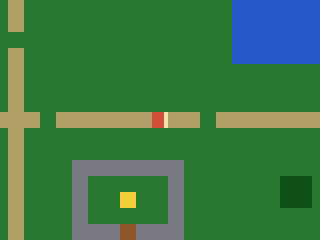
solid_at(pixel_x, pixel_y) převede souřadnici ve světě na dlaždici a zkontroluje, zda
patří do množiny SOLID. can_walk() takto prověří všechny čtyři rohy hrdiny. Pohyb po
osách X a Y testujeme odděleně, takže při diagonálním pohybu podél zdi sklouzneš,
místo abys se o ni zastavil. Modul picogame_tiles nabízí stejné testy
pro dlaždice i jako hotové pomocné funkce. Uvidíš: že tě voda, stromy a zdi zastaví.
Zkus: přidej hodnotu dlaždice do SOLID nebo některou odeber.
54 collapsed lines
# Quest -- step 3: walls (tile-based collision).## What you learn: stop the hero walking through water/trees/walls. Convert a world# pixel to a tile (tx = px // TILE), look the tile up, and treat some values as# SOLID. can_walk() probes the hero's body (its four corners, inset a little) so it# can't clip into a wall. We test the X and Y moves SEPARATELY, so the hero slides# along a wall instead of sticking when you push diagonally into it.## New vs step 2: solid_at()/can_walk() pixel->tile collision, per-axis movement.## Run: python3 sim/run.py tutorials/03-quest/step3_walls.py --hold RIGHT --shot /tmp/q3.png
import arrayimport picogame as pgimport picogame_gameimport picogame_inputimport picogame_clockimport picogame_shapes as shp
W, H = picogame_game.screen() # never hardcode: the same game runs at 240x240 and 640x480TILE = 16SPEED = 2MAP = [ "##############################", "#.....:......................#", "#.....:........*.............#", "#..##.:.............~~~~~~...#", "#..##.:.............~~~~~~...#", "#.....N.............~~~~~~...#", "#.....:.......E.....~~~~~~...#", "#.....:......................#", "#.....:.....*.........*......#", "#.....:......................#", "#:::::::P:::::::::*::::::::::#", "#.....:...................*..#", "#.....:.............E........#", "#.....:...WWWWWWW............#", "#.....:...W.....W......##....#", "#.....:.*.W..G..W......##....#", "#.....:...W.....W........E...#", "#.....:...WWWDWWW............#", "#.....:......................#", "##############################",]MAPCOLS, MAPROWS = 30, 20# tile values (frame index into the colour tileset; 0 = empty)GRASS, PATH, WATER, TREE, WALL, DOOR, GOAL = 1, 2, 3, 4, 5, 6, 7CHAR2TILE = {".": GRASS, "P": GRASS, "N": GRASS, "*": GRASS, "E": GRASS, ":": PATH, "~": WATER, "#": TREE, "W": WALL, "D": DOOR, "G": GOAL}TILE_RGB = [(40, 120, 50), # GRASS (180, 160, 110), # PATH (40, 90, 200), # WATER (20, 80, 30), # TREE (120, 120, 130), # WALL (150, 90, 40), # DOOR (240, 210, 60)] # GOALSOLID = (WATER, TREE, WALL, DOOR) # these tiles block movementDOWN, UP, LEFT, RIGHT = 0, 1, 2, 3 # facing -> frame index
scene, _, _ = picogame_game.setup(background=pg.rgb565(0, 0, 0))37 collapsed lines
btn = picogame_input.Buttons()clock = picogame_clock.Clock(30)
tileset = shp.tileset_colors(TILE, TILE, [pg.rgb565(*color) for color in TILE_RGB])world = pg.Tilemap(tileset, MAPCOLS, MAPROWS)hero_x, hero_y = TILE, TILEfor tile_y in range(MAPROWS): for tile_x in range(MAPCOLS): char = MAP[tile_y][tile_x] if tile_x < len(MAP[tile_y]) else "." world.set_tile(tile_x, tile_y, CHAR2TILE.get(char, GRASS)) if char == "P": hero_x, hero_y = tile_x * TILE, tile_y * TILEscene.add(world)
# a PLACEHOLDER hero: a plain red square with a brighter bar on the facing edge, so you# can see which way it points. 4 frames = 4 directions (frame = facing). Step 4 replaces# it with a real drawn character.RED = pg.rgb565(210, 80, 60)EDGE = pg.rgb565(255, 225, 170)
def hero_bitmap(): palette = array.array("H", [pg.rgb565(0, 0, 0), RED, EDGE]) # index 0 = transparent stride = TILE * 4 # 4 frames side by side, 1 byte/px data = bytearray(stride * TILE) for facing in range(4): # 0 down, 1 up, 2 left, 3 right for y in range(TILE): for x in range(TILE): on_facing_edge = ((facing == 0 and y >= TILE - 3) or (facing == 1 and y < 3) or (facing == 2 and x < 3) or (facing == 3 and x >= TILE - 3)) data[y * stride + facing * TILE + x] = 2 if on_facing_edge else 1 return pg.Bitmap(data, TILE, TILE, format=pg.PAL8, palette=palette, frames=4, stride=stride)
hero = pg.Sprite(hero_bitmap(), hero_x, hero_y, frame=DOWN)scene.add(hero)
def solid_at(pixel_x, pixel_y): tile_x, tile_y = pixel_x // TILE, pixel_y // TILE if tile_x < 0 or tile_x >= MAPCOLS or tile_y < 0 or tile_y >= MAPROWS: return True return world.get_tile(tile_x, tile_y) in SOLID
def can_walk(pixel_x, pixel_y): # probe the hero's body corners (inset 2px) -- all must be free return not (solid_at(pixel_x + 2, pixel_y + 2) or solid_at(pixel_x + TILE - 3, pixel_y + 2) or solid_at(pixel_x + 2, pixel_y + TILE - 3) or solid_at(pixel_x + TILE - 3, pixel_y + TILE - 3))
def camera_follow(): offset_x = max(W - MAPCOLS * TILE, min(0, W // 2 - (hero.x + TILE // 2)))8 collapsed lines
offset_y = max(H - MAPROWS * TILE, min(0, H // 2 - (hero.y + TILE // 2))) scene.set_view(int(offset_x), int(offset_y))
camera_follow()while True: btn.poll() delta_x = btn.is_pressed(btn.RIGHT) - btn.is_pressed(btn.LEFT) delta_y = btn.is_pressed(btn.DOWN) - btn.is_pressed(btn.UP) if delta_x: hero.frame = RIGHT if delta_x > 0 else LEFT elif delta_y: hero.frame = DOWN if delta_y > 0 else UP
moved = False if delta_x and can_walk(hero.x + delta_x * SPEED, hero.y): # test X alone hero.move(hero.x + delta_x * SPEED, hero.y); moved = True if delta_y and can_walk(hero.x, hero.y + delta_y * SPEED): # then Y alone -> slide hero.move(hero.x, hero.y + delta_y * SPEED); moved = True if moved: camera_follow()
scene.refresh() clock.tick()Krok 4 — step4_anim.py · animace chůze
Sekce “Krok 4 — step4_anim.py · animace chůze”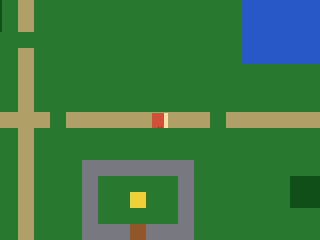 Červený čtverec teď nahradíme postavou z ASCII masek. Pro směry dolů, nahoru a do strany
má vždy dvě pózy; pohled doleva vznikne zrcadlením bočního pohledu pomocí
Červený čtverec teď nahradíme postavou z ASCII masek. Pro směry dolů, nahoru a do strany
má vždy dvě pózy; pohled doleva vznikne zrcadlením bočního pohledu pomocí flip_x.
AnimatedSprite z modulu picogame_anim přepíná animace: play(name)
vybere směr a tick(dt) posune snímek podle času z clock.tick(). Rychlost chůze proto
nezávisí na snímkové frekvenci. Uvidíš: animaci chůze ve směru pohybu a klidovou pózu,
když stojíš. Zkus: změň fps animace.
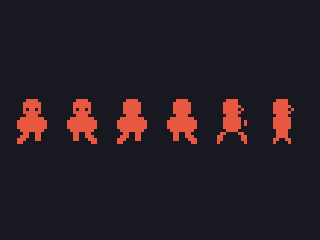
Ručně kreslené ASCII masky ti dovolí soustředit se na animační kód. Pro vlastní grafiku
můžeš nakreslit obrázkový sprite sheet, převést jej pomocí tools/png2picogame.py na
Bitmap a animovat podle indexu snímku. Oba postupy používají stejný AnimatedSprite.
Podrobnosti najdeš v průvodci grafikou a v souboru bonus_art.py
u každého tutoriálu.
22 collapsed lines
# Quest -- step 4: a walking animation.## What you learn: time-based animation -- and giving the hero real art. We retire the# placeholder square and draw a proper character from ASCII masks (down / up / side, with# LEFT the side view mirrored by flip_x), with TWO poses per facing, then drive the walk# with picogame_anim.AnimatedSprite: play(name) picks the facing's animation, tick(dt)# advances it with the real dt from clock.tick() (so the walk speed is frame-rate# independent); standing still we show the still pose.## Here the frames are hand-drawn masks (no asset), so we animate by SWAPPING whole# bitmaps. A REAL game usually loads a proper image sprite-sheet (a PNG baked with# tools/png2picogame.py -> one multi-frame Bitmap) and animates by frame INDEX -- the# same AnimatedSprite drives that too. See the bonus_art step / the assets guide.## New vs step 3: the drawn masked hero (replacing the placeholder square) + sprite.flip_x# for LEFT, two walk poses per facing, picogame_anim.AnimatedSprite over a bitmap list,# play()/tick(dt), the dt from clock.tick().## Run: python3 sim/run.py tutorials/03-quest/step4_anim.py --hold RIGHT --shot /tmp/q4.png
import picogame as pgimport picogame_gameimport picogame_inputimport picogame_clockimport picogame_animimport picogame_shapes as shp
36 collapsed lines
W, H = picogame_game.screen() # never hardcode: the same game runs at 240x240 and 640x480TILE = 16SPEED = 2MAP = [ "##############################", "#.....:......................#", "#.....:........*.............#", "#..##.:.............~~~~~~...#", "#..##.:.............~~~~~~...#", "#.....N.............~~~~~~...#", "#.....:.......E.....~~~~~~...#", "#.....:......................#", "#.....:.....*.........*......#", "#.....:......................#", "#:::::::P:::::::::*::::::::::#", "#.....:...................*..#", "#.....:.............E........#", "#.....:...WWWWWWW............#", "#.....:...W.....W......##....#", "#.....:.*.W..G..W......##....#", "#.....:...W.....W........E...#", "#.....:...WWWDWWW............#", "#.....:......................#", "##############################",]MAPCOLS, MAPROWS = 30, 20# tile values (frame index into the colour tileset; 0 = empty)GRASS, PATH, WATER, TREE, WALL, DOOR, GOAL = 1, 2, 3, 4, 5, 6, 7CHAR2TILE = {".": GRASS, "P": GRASS, "N": GRASS, "*": GRASS, "E": GRASS, ":": PATH, "~": WATER, "#": TREE, "W": WALL, "D": DOOR, "G": GOAL}TILE_RGB = [(40, 120, 50), # GRASS (180, 160, 110), # PATH (40, 90, 200), # WATER (20, 80, 30), # TREE (120, 120, 130), # WALL (150, 90, 40), # DOOR (240, 210, 60)] # GOALSOLID = (WATER, TREE, WALL, DOOR) # these tiles block movementDOWN, UP, LEFT, RIGHT = 0, 1, 2, 3FACING_ANIM = ("down", "up", "side", "side") # animation per facing (left/right share the side art)WALK_FPS = 8
scene, _, _ = picogame_game.setup(background=pg.rgb565(0, 0, 0))13 collapsed lines
btn = picogame_input.Buttons()clock = picogame_clock.Clock(30)
tileset = shp.tileset_colors(TILE, TILE, [pg.rgb565(*color) for color in TILE_RGB])world = pg.Tilemap(tileset, MAPCOLS, MAPROWS)hero_x, hero_y = TILE, TILEfor tile_y in range(MAPROWS): for tile_x in range(MAPCOLS): char = MAP[tile_y][tile_x] if tile_x < len(MAP[tile_y]) else "." world.set_tile(tile_x, tile_y, CHAR2TILE.get(char, GRASS)) if char == "P": hero_x, hero_y = tile_x * TILE, tile_y * TILEscene.add(world)
# --- the hero: ASCII pixel art you can edit. '#' = a pixel, '.' = transparent. One# colour = a 1-bit silhouette; the FACING reads from the shape: DOWN has eyes, UP is# the back of the head, SIDE is a profile with a nose (LEFT = SIDE mirrored at runtime# with flip_x). Two poses per facing make the walk -- the legs scissor between A and B.HERO_COLOR = pg.rgb565(235, 90, 70)DOWN_A = [ "................", ".....####.......", "....######......", "....######......", "....#.##.#......", # eye gaps -> the face "....######......", ".....####.......", "...########.....", "..##########....", "..##########....", "..##########....", "...########.....", "....##..##......", "...###..##......", "..###...##......", # left foot forward "..##............",]DOWN_B = [ "................", ".....####.......", "....######......", "....######......", "....#.##.#......", "....######......", ".....####.......", "...########.....", "..##########....", "..##########....", "..##########....", "...########.....", "....##..##......", "....##..###.....", "....##...###....", # right foot forward "..........##....",]UP_A = [ "................", ".....####.......", "....######......", "....######......", "....######......", # solid head = the hero's back "....######......", ".....####.......", "...########.....", "..##########....", "..##########....", "..##########....", "...########.....", "....##..##......", "...###..##......", "..###...##......", "..##............",]UP_B = [ "................", ".....####.......", "....######......", "....######......", "....######......", "....######......", ".....####.......", "...########.....", "..##########....", "..##########....", "..##########....", "...########.....", "....##..##......", "....##..###.....", "....##...###....", "..........##....",]SIDE_A = [ "................", ".....####.......", "....#####.......", "....######......", "....#####.#.....", # nose nub -> faces right (flip_x -> left) "....######......", ".....####.......", "....######......", "....######.#....", # arm swung forward "....######.#....", "....######......", ".....####.......", "...##....##.....", # legs split "..##......##....", "..##......##....", "..#........#....",]SIDE_B = [ "................", ".....####.......", "....#####.......", "....######......", "....#####.#.....", "....######......", ".....####.......", "....######......", "....######......", # arm tucked in "....######......", "....######......", ".....####.......", ".....####.......", # legs pass under the body ".....####.......", "....##..##......", "....#....#......",]BM = {"down": [shp.from_mask(DOWN_A, HERO_COLOR), shp.from_mask(DOWN_B, HERO_COLOR)], "up": [shp.from_mask(UP_A, HERO_COLOR), shp.from_mask(UP_B, HERO_COLOR)], "side": [shp.from_mask(SIDE_A, HERO_COLOR), shp.from_mask(SIDE_B, HERO_COLOR)]}
hero = pg.Sprite(BM["down"][0], hero_x, hero_y)# each entry: name: (bitmap list, frames-per-second, loop?) -- AnimatedSprite accepts# a list of Bitmaps to swap in, not only frame indices into one sheetwalk = picogame_anim.AnimatedSprite(hero, { "down": (BM["down"], WALK_FPS, True), "up": (BM["up"], WALK_FPS, True), "side": (BM["side"], WALK_FPS, True)})scene.add(hero)
facing = DOWN
def solid_at(pixel_x, pixel_y): tile_x, tile_y = pixel_x // TILE, pixel_y // TILE15 collapsed lines
if tile_x < 0 or tile_x >= MAPCOLS or tile_y < 0 or tile_y >= MAPROWS: return True return world.get_tile(tile_x, tile_y) in SOLID
def can_walk(pixel_x, pixel_y): return not (solid_at(pixel_x + 2, pixel_y + 2) or solid_at(pixel_x + TILE - 3, pixel_y + 2) or solid_at(pixel_x + 2, pixel_y + TILE - 3) or solid_at(pixel_x + TILE - 3, pixel_y + TILE - 3))
def camera_follow(): offset_x = max(W - MAPCOLS * TILE, min(0, W // 2 - (hero.x + TILE // 2))) offset_y = max(H - MAPROWS * TILE, min(0, H // 2 - (hero.y + TILE // 2))) scene.set_view(int(offset_x), int(offset_y))
camera_follow()dt = 1 / 30 # assume one 30fps frame for the first tick; clock.tick() returns real dt after thatwhile True: btn.poll() # True/False count as 1/0, so this is -1 (left), 0, or +1 (right) delta_x = btn.is_pressed(btn.RIGHT) - btn.is_pressed(btn.LEFT) delta_y = btn.is_pressed(btn.DOWN) - btn.is_pressed(btn.UP) if delta_x: facing = RIGHT if delta_x > 0 else LEFT elif delta_y: facing = DOWN if delta_y > 0 else UP hero.flip_x = (facing == LEFT) # mirror the side art for LEFT
moved = False if delta_x and can_walk(hero.x + delta_x * SPEED, hero.y): hero.move(hero.x + delta_x * SPEED, hero.y); moved = True if delta_y and can_walk(hero.x, hero.y + delta_y * SPEED): hero.move(hero.x, hero.y + delta_y * SPEED); moved = True if moved: camera_follow() walk.play(FACING_ANIM[facing]) # animate the walk while moving walk.tick(dt) else: hero.bitmap = BM[FACING_ANIM[facing]][0] # still: pose A of the current facing
scene.refresh() dt = clock.tick()Krok 5 — step5_items.py · předměty a pevný HUD
Sekce “Krok 5 — step5_items.py · předměty a pevný HUD”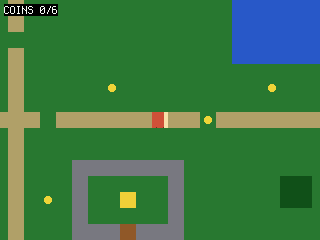 Mince jsou sprity umístěné podle mapy, takže se pohybují spolu se světem. Když se k
minci hrdina přiblíží, skryjeme ji a zvýšíme počítadlo.
Mince jsou sprity umístěné podle mapy, takže se pohybují spolu se světem. Když se k
minci hrdina přiblíží, skryjeme ji a zvýšíme počítadlo. SceneLabel z modulu
picogame_ui leží v pevné vrstvě scény: kamera jej neposouvá, a tak
zůstává v rohu obrazovky. Uvidíš: mince rozeseté po světě a stálé počítadlo v rohu.
Zkus: přidej do mapy další mince *.
12 collapsed lines
# Quest -- step 5: collectible items + a HUD over the scrolling world.## What you learn: world-space pickups and a camera-fixed HUD. Coins are sprites# placed at map positions; because they're normal scene items they scroll with the# world. We collect one when the hero is close enough (a simple distance test), hide# it, and bump a counter. picogame_ui.SceneLabel is a FIXED scene layer -- it does NOT# scroll, so the coin counter stays pinned to the corner while the world moves under# it.## New vs step 4: item sprites placed from the map, distance-based pickup, a fixed# SceneLabel counter.## Run: python3 sim/run.py tutorials/03-quest/step5_items.py --hold RIGHT --shot /tmp/q5.png
import terminalioimport picogame as pgimport picogame_gameimport picogame_inputimport picogame_clockimport picogame_animimport picogame_shapes as shpimport picogame_ui as ui
W, H = picogame_game.screen() # never hardcode: the same game runs at 240x240 and 640x48038 collapsed lines
TILE = 16SPEED = 2MAP = [ "##############################", "#.....:......................#", "#.....:........*.............#", "#..##.:.............~~~~~~...#", "#..##.:.............~~~~~~...#", "#.....N.............~~~~~~...#", "#.....:.......E.....~~~~~~...#", "#.....:......................#", "#.....:.....*.........*......#", "#.....:......................#", "#:::::::P:::::::::*::::::::::#", "#.....:...................*..#", "#.....:.............E........#", "#.....:...WWWWWWW............#", "#.....:...W.....W......##....#", "#.....:.*.W..G..W......##....#", "#.....:...W.....W........E...#", "#.....:...WWWDWWW............#", "#.....:......................#", "##############################",]MAPCOLS, MAPROWS = 30, 20# tile values (frame index into the colour tileset; 0 = empty)GRASS, PATH, WATER, TREE, WALL, DOOR, GOAL = 1, 2, 3, 4, 5, 6, 7CHAR2TILE = {".": GRASS, "P": GRASS, "N": GRASS, "*": GRASS, "E": GRASS, ":": PATH, "~": WATER, "#": TREE, "W": WALL, "D": DOOR, "G": GOAL}TILE_RGB = [(40, 120, 50), # GRASS (180, 160, 110), # PATH (40, 90, 200), # WATER (20, 80, 30), # TREE (120, 120, 130), # WALL (150, 90, 40), # DOOR (240, 210, 60)] # GOALSOLID = (WATER, TREE, WALL, DOOR) # these tiles block movementDOWN, UP, LEFT, RIGHT = 0, 1, 2, 3FACING_ANIM = ("down", "up", "side", "side") # animation per facing (left/right share the side art)WALK_FPS = 8BACKGROUND = pg.rgb565(0, 0, 0)
scene, _, _ = picogame_game.setup(background=BACKGROUND)btn = picogame_input.Buttons()clock = picogame_clock.Clock(30)
tileset = shp.tileset_colors(TILE, TILE, [pg.rgb565(*color) for color in TILE_RGB])world = pg.Tilemap(tileset, MAPCOLS, MAPROWS)hero_x, hero_y = TILE, TILEcoin_spots = []for tile_y in range(MAPROWS): for tile_x in range(MAPCOLS): char = MAP[tile_y][tile_x] if tile_x < len(MAP[tile_y]) else "." world.set_tile(tile_x, tile_y, CHAR2TILE.get(char, GRASS)) if char == "P": hero_x, hero_y = tile_x * TILE, tile_y * TILE elif char == "*": coin_spots.append((tile_x * TILE, tile_y * TILE))scene.add(world)
coin_bitmap = shp.circle(8, pg.rgb565(245, 215, 60))coins = [pg.Sprite(coin_bitmap, x + 4, y + 4) for (x, y) in coin_spots] # +4 to centre in tilefor coin in coins: scene.add(coin)
# --- the hero: ASCII pixel art you can edit. '#' = a pixel, '.' = transparent. One# colour = a 1-bit silhouette; the FACING reads from the shape: DOWN has eyes, UP is118 collapsed lines
# the back of the head, SIDE is a profile with a nose (LEFT = SIDE mirrored at runtime# with flip_x). Two poses per facing make the walk -- the legs scissor between A and B.HERO_COLOR = pg.rgb565(235, 90, 70)DOWN_A = [ "................", ".....####.......", "....######......", "....######......", "....#.##.#......", # eye gaps -> the face "....######......", ".....####.......", "...########.....", "..##########....", "..##########....", "..##########....", "...########.....", "....##..##......", "...###..##......", "..###...##......", # left foot forward "..##............",]DOWN_B = [ "................", ".....####.......", "....######......", "....######......", "....#.##.#......", "....######......", ".....####.......", "...########.....", "..##########....", "..##########....", "..##########....", "...########.....", "....##..##......", "....##..###.....", "....##...###....", # right foot forward "..........##....",]UP_A = [ "................", ".....####.......", "....######......", "....######......", "....######......", # solid head = the hero's back "....######......", ".....####.......", "...########.....", "..##########....", "..##########....", "..##########....", "...########.....", "....##..##......", "...###..##......", "..###...##......", "..##............",]UP_B = [ "................", ".....####.......", "....######......", "....######......", "....######......", "....######......", ".....####.......", "...########.....", "..##########....", "..##########....", "..##########....", "...########.....", "....##..##......", "....##..###.....", "....##...###....", "..........##....",]SIDE_A = [ "................", ".....####.......", "....#####.......", "....######......", "....#####.#.....", # nose nub -> faces right (flip_x -> left) "....######......", ".....####.......", "....######......", "....######.#....", # arm swung forward "....######.#....", "....######......", ".....####.......", "...##....##.....", # legs split "..##......##....", "..##......##....", "..#........#....",]SIDE_B = [ "................", ".....####.......", "....#####.......", "....######......", "....#####.#.....", "....######......", ".....####.......", "....######......", "....######......", # arm tucked in "....######......", "....######......", ".....####.......", ".....####.......", # legs pass under the body ".....####.......", "....##..##......", "....#....#......",]BM = {"down": [shp.from_mask(DOWN_A, HERO_COLOR), shp.from_mask(DOWN_B, HERO_COLOR)], "up": [shp.from_mask(UP_A, HERO_COLOR), shp.from_mask(UP_B, HERO_COLOR)], "side": [shp.from_mask(SIDE_A, HERO_COLOR), shp.from_mask(SIDE_B, HERO_COLOR)]}hero = pg.Sprite(BM["down"][0], hero_x, hero_y)walk = picogame_anim.AnimatedSprite(hero, { "down": (BM["down"], WALK_FPS, True), "up": (BM["up"], WALK_FPS, True), "side": (BM["side"], WALK_FPS, True)})scene.add(hero)hud = ui.SceneLabel(scene, pg, terminalio.FONT, 4, 4, pg.rgb565(255, 255, 255), BACKGROUND)
facing = DOWNcoins_collected = 0
17 collapsed lines
def solid_at(pixel_x, pixel_y): tile_x, tile_y = pixel_x // TILE, pixel_y // TILE if tile_x < 0 or tile_x >= MAPCOLS or tile_y < 0 or tile_y >= MAPROWS: return True return world.get_tile(tile_x, tile_y) in SOLID
def can_walk(pixel_x, pixel_y): return not (solid_at(pixel_x + 2, pixel_y + 2) or solid_at(pixel_x + TILE - 3, pixel_y + 2) or solid_at(pixel_x + 2, pixel_y + TILE - 3) or solid_at(pixel_x + TILE - 3, pixel_y + TILE - 3))
def camera_follow(): offset_x = max(W - MAPCOLS * TILE, min(0, W // 2 - (hero.x + TILE // 2))) offset_y = max(H - MAPROWS * TILE, min(0, H // 2 - (hero.y + TILE // 2))) scene.set_view(int(offset_x), int(offset_y))
camera_follow()dt = 1 / 30while True: btn.poll()14 collapsed lines
# True/False count as 1/0, so this is -1 (left), 0, or +1 (right) delta_x = btn.is_pressed(btn.RIGHT) - btn.is_pressed(btn.LEFT) delta_y = btn.is_pressed(btn.DOWN) - btn.is_pressed(btn.UP) if delta_x: facing = RIGHT if delta_x > 0 else LEFT elif delta_y: facing = DOWN if delta_y > 0 else UP hero.flip_x = (facing == LEFT) # mirror the side art for LEFT
moved = False if delta_x and can_walk(hero.x + delta_x * SPEED, hero.y): hero.move(hero.x + delta_x * SPEED, hero.y); moved = True if delta_y and can_walk(hero.x, hero.y + delta_y * SPEED): hero.move(hero.x, hero.y + delta_y * SPEED); moved = True if moved: camera_follow() walk.play(FACING_ANIM[facing]); walk.tick(dt) else: hero.bitmap = BM[FACING_ANIM[facing]][0] # still: pose A of the current facing
# pick up any coin we're standing on (within ~12px on both axes = close enough) for coin in coins: if coin.visible and abs(hero.x - coin.x) < 12 and abs(hero.y - coin.y) < 12: coin.visible = False coins_collected += 1
hud.set("COINS %d/%d" % (coins_collected, len(coins))) scene.refresh() dt = clock.tick()Krok 6 — step6_npc.py · rozhovor s NPC
Sekce “Krok 6 — step6_npc.py · rozhovor s NPC”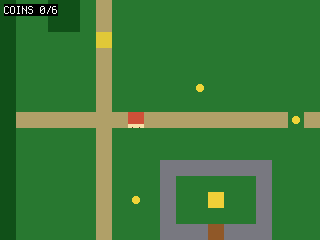 Postav se vedle NPC a tlačítkem A přepni hru do režimu dialogu. Svět zůstane pod
dialogem a
Postav se vedle NPC a tlačítkem A přepni hru do režimu dialogu. Svět zůstane pod
dialogem a picogame_ui.TextBox přes něj vykreslí zprávu. Do dalšího stisku tlačítka se
hrdina nemůže pohybovat. Uvidíš: výzvu „PRESS A“ poblíž NPC a potom dialogové okno.
Zkus: změň texty v LINES.
Úklid: objekt State. Měnitelných proměnných přibývá a jako globály vyžadují global v každé funkci, která je mění. Proto je seskupíme do jedné class State (st.coins, st.mode); objekty, které se nikdy nepřepisují (hrdina, tilemapa), zůstávají na úrovni modulu.
23 collapsed lines
# Quest -- step 6: an NPC you can talk to (and a State object + a main() loop to tidy up).## What you learn: interaction + a simple state machine for dialog, AND how to keep# the growing pile of game variables under control. An NPC is a sprite; when the hero# stands next to it and presses A we switch to a DIALOG mode: the world keeps drawing# underneath, and picogame_ui.TextBox draws a multi-line message box on top (a# screen-space overlay, drawn after scene.refresh). While in dialog we DON'T process# movement -- the game is paused on the box until you press a button to dismiss it.## State object: the loose module variables have been piling up (facing, coins, a# mode, a "dialog shown" flag...) and the next steps add HP, a cooldown, a quest# stage. Instead of a scatter of globals (and a `global` in every function that# touches them), we group them in ONE `class State` and make `st = State()`. Now it's# `st.coins`, `st.mode`, with no `global` needed. Objects that never get REASSIGNED# (the hero Sprite, the world Tilemap, the labels) stay plain module-level names;# State holds only the mutable scalars. The game mode is a named INT constant# (EXPLORE / DIALOG) rather than a magic string, so a branch reads `st.mode ==# DIALOG`.## New vs step 5: an NPC sprite, a State object, the loop moved into a main() function,# a mode machine (EXPLORE/DIALOG), picogame_ui.TextBox, freezing the world during# dialog, an adjacency "PRESS A" prompt.## Run: python3 sim/run.py tutorials/03-quest/step6_npc.py --shot /tmp/q6.png
import boardimport terminalioimport picogame as pg44 collapsed lines
import picogame_gameimport picogame_inputimport picogame_clockimport picogame_animimport picogame_shapes as shpimport picogame_ui as ui
W, H = picogame_game.screen() # never hardcode: the same game runs at 240x240 and 640x480TILE = 16SPEED = 2MAP = [ "##############################", "#.....:......................#", "#.....:........*.............#", "#..##.:.............~~~~~~...#", "#..##.:.............~~~~~~...#", "#.....N.............~~~~~~...#", "#.....:.......E.....~~~~~~...#", "#.....:......................#", "#.....:.....*.........*......#", "#.....:......................#", "#:::::::P:::::::::*::::::::::#", "#.....:...................*..#", "#.....:.............E........#", "#.....:...WWWWWWW............#", "#.....:...W.....W......##....#", "#.....:.*.W..G..W......##....#", "#.....:...W.....W........E...#", "#.....:...WWWDWWW............#", "#.....:......................#", "##############################",]MAPCOLS, MAPROWS = 30, 20# tile values (frame index into the colour tileset; 0 = empty)GRASS, PATH, WATER, TREE, WALL, DOOR, GOAL = 1, 2, 3, 4, 5, 6, 7CHAR2TILE = {".": GRASS, "P": GRASS, "N": GRASS, "*": GRASS, "E": GRASS, ":": PATH, "~": WATER, "#": TREE, "W": WALL, "D": DOOR, "G": GOAL}TILE_RGB = [(40, 120, 50), # GRASS (180, 160, 110), # PATH (40, 90, 200), # WATER (20, 80, 30), # TREE (120, 120, 130), # WALL (150, 90, 40), # DOOR (240, 210, 60)] # GOALSOLID = (WATER, TREE, WALL, DOOR) # these tiles block movementDOWN, UP, LEFT, RIGHT = 0, 1, 2, 3FACING_ANIM = ("down", "up", "side", "side") # animation per facing (left/right share the side art)EXPLORE, DIALOG = 0, 1 # game modes (int constants, not strings)WALK_FPS = 8 # walk-animation speed (frames per second)BACKGROUND = pg.rgb565(0, 0, 0)WHITE = pg.rgb565(255, 255, 255)NAVY = pg.rgb565(10, 10, 40)
# buffer_a/buffer_b = the engine's two shared render strips; immediate-mode draws# (the dialog box below) paint straight into buffer_ascene, buffer_a, buffer_b = picogame_game.setup(background=BACKGROUND)btn = picogame_input.Buttons()clock = picogame_clock.Clock(30)
tileset = shp.tileset_colors(TILE, TILE, [pg.rgb565(*color) for color in TILE_RGB])world = pg.Tilemap(tileset, MAPCOLS, MAPROWS)hero_x, hero_y = TILE, TILEnpc_x, npc_y = TILE, TILEcoin_spots = []for tile_y in range(MAPROWS): for tile_x in range(MAPCOLS): char = MAP[tile_y][tile_x] if tile_x < len(MAP[tile_y]) else "." world.set_tile(tile_x, tile_y, CHAR2TILE.get(char, GRASS)) if char == "P": hero_x, hero_y = tile_x * TILE, tile_y * TILE elif char == "N": npc_x, npc_y = tile_x * TILE, tile_y * TILE elif char == "*": coin_spots.append((tile_x * TILE, tile_y * TILE))scene.add(world)
coin_bitmap = shp.circle(8, pg.rgb565(245, 215, 60))coins = [pg.Sprite(coin_bitmap, x + 4, y + 4) for (x, y) in coin_spots]for coin in coins: scene.add(coin)npc = pg.Sprite(shp.rect(TILE, TILE, pg.rgb565(230, 200, 60)), npc_x, npc_y)scene.add(npc)
120 collapsed lines
# --- the hero: ASCII pixel art you can edit. '#' = a pixel, '.' = transparent. One# colour = a 1-bit silhouette; the FACING reads from the shape: DOWN has eyes, UP is# the back of the head, SIDE is a profile with a nose (LEFT = SIDE mirrored at runtime# with flip_x). Two poses per facing make the walk -- the legs scissor between A and B.HERO_COLOR = pg.rgb565(235, 90, 70)DOWN_A = [ "................", ".....####.......", "....######......", "....######......", "....#.##.#......", # eye gaps -> the face "....######......", ".....####.......", "...########.....", "..##########....", "..##########....", "..##########....", "...########.....", "....##..##......", "...###..##......", "..###...##......", # left foot forward "..##............",]DOWN_B = [ "................", ".....####.......", "....######......", "....######......", "....#.##.#......", "....######......", ".....####.......", "...########.....", "..##########....", "..##########....", "..##########....", "...########.....", "....##..##......", "....##..###.....", "....##...###....", # right foot forward "..........##....",]UP_A = [ "................", ".....####.......", "....######......", "....######......", "....######......", # solid head = the hero's back "....######......", ".....####.......", "...########.....", "..##########....", "..##########....", "..##########....", "...########.....", "....##..##......", "...###..##......", "..###...##......", "..##............",]UP_B = [ "................", ".....####.......", "....######......", "....######......", "....######......", "....######......", ".....####.......", "...########.....", "..##########....", "..##########....", "..##########....", "...########.....", "....##..##......", "....##..###.....", "....##...###....", "..........##....",]SIDE_A = [ "................", ".....####.......", "....#####.......", "....######......", "....#####.#.....", # nose nub -> faces right (flip_x -> left) "....######......", ".....####.......", "....######......", "....######.#....", # arm swung forward "....######.#....", "....######......", ".....####.......", "...##....##.....", # legs split "..##......##....", "..##......##....", "..#........#....",]SIDE_B = [ "................", ".....####.......", "....#####.......", "....######......", "....#####.#.....", "....######......", ".....####.......", "....######......", "....######......", # arm tucked in "....######......", "....######......", ".....####.......", ".....####.......", # legs pass under the body ".....####.......", "....##..##......", "....#....#......",]BM = {"down": [shp.from_mask(DOWN_A, HERO_COLOR), shp.from_mask(DOWN_B, HERO_COLOR)], "up": [shp.from_mask(UP_A, HERO_COLOR), shp.from_mask(UP_B, HERO_COLOR)], "side": [shp.from_mask(SIDE_A, HERO_COLOR), shp.from_mask(SIDE_B, HERO_COLOR)]}hero = pg.Sprite(BM["down"][0], hero_x, hero_y)walk = picogame_anim.AnimatedSprite(hero, { "down": (BM["down"], WALK_FPS, True), "up": (BM["up"], WALK_FPS, True), "side": (BM["side"], WALK_FPS, True)})scene.add(hero)hud = ui.SceneLabel(scene, pg, terminalio.FONT, 4, 4, WHITE, BACKGROUND)dialog = ui.TextBox(pg, terminalio.FONT, 8, H - 64, W - 16, 58, WHITE, NAVY, maxlines=4)LINES = ["Villager:", "Beware the slimes in the", "tall grass, traveller.", "(press A)"]
class State: """All the mutable game variables in one place (was a pile of module globals). __init__ just calls reset(), so every default lives in ONE spot and a restart would be a single call -- st.reset().""" def __init__(self): self.reset()
def reset(self): self.facing = DOWN self.coins = 0 self.mode = EXPLORE # EXPLORE = walking around, DIALOG = talking self.dlg_shown = False # draw the modal once, not every frame
st = State()
def solid_at(pixel_x, pixel_y): tile_x, tile_y = pixel_x // TILE, pixel_y // TILE8 collapsed lines
if tile_x < 0 or tile_x >= MAPCOLS or tile_y < 0 or tile_y >= MAPROWS: return True return world.get_tile(tile_x, tile_y) in SOLID
def can_walk(pixel_x, pixel_y): return not (solid_at(pixel_x + 2, pixel_y + 2) or solid_at(pixel_x + TILE - 3, pixel_y + 2) or solid_at(pixel_x + 2, pixel_y + TILE - 3) or solid_at(pixel_x + TILE - 3, pixel_y + TILE - 3))
def near_npc(): # Adjacency is enough HERE: one interactable and A has no other role nearby. A game where # A also attacks gates this on facing too (st.facing points at the NPC) - genre rule. return abs(hero.x - npc.x) <= TILE and abs(hero.y - npc.y) <= TILE
def camera_follow(): offset_x = max(W - MAPCOLS * TILE, min(0, W // 2 - (hero.x + TILE // 2))) offset_y = max(H - MAPROWS * TILE, min(0, H // 2 - (hero.y + TILE // 2))) scene.set_view(int(offset_x), int(offset_y))
camera_follow()# The per-frame loop now lives in a FUNCTION (main), not at module scope. Inside a# function its names -- st, the loop's own delta_x/dt, the helpers -- resolve as fast# array-indexed locals instead of globals-dict lookups; on the device that's a# measured speed-up for the hot loop. It pairs naturally with the State tidy-up: one# st object + one main() is the shape every bigger game grows into.def main(): dt = 1 / 30 # seed the first frame; re-set from clock.tick() each loop while True: btn.poll()
if st.mode == DIALOG: if not st.dlg_shown: # draw ONCE -> no per-frame flicker scene.refresh() # world frozen under the box dialog.draw(scene.display, buffer_a, LINES) st.dlg_shown = True if btn.just_pressed(btn.A) or btn.just_pressed(btn.B): st.mode = EXPLORE scene.invalidate() # repaint over the box next frame clock.tick() continue
delta_x = btn.is_pressed(btn.RIGHT) - btn.is_pressed(btn.LEFT) delta_y = btn.is_pressed(btn.DOWN) - btn.is_pressed(btn.UP) if delta_x: st.facing = RIGHT if delta_x > 0 else LEFT elif delta_y: st.facing = DOWN if delta_y > 0 else UP hero.flip_x = (st.facing == LEFT) # mirror the side art for LEFT
moved = False if delta_x and can_walk(hero.x + delta_x * SPEED, hero.y): hero.move(hero.x + delta_x * SPEED, hero.y); moved = True if delta_y and can_walk(hero.x, hero.y + delta_y * SPEED): hero.move(hero.x, hero.y + delta_y * SPEED); moved = True if moved: camera_follow() walk.play(FACING_ANIM[st.facing]) # animate the walk while moving walk.tick(dt) else: hero.bitmap = BM[FACING_ANIM[st.facing]][0] # still: pose A of the current facing
# pick up any coin we're standing on (within ~12px on both axes = close enough) for coin in coins: if coin.visible and abs(hero.x - coin.x) < 12 and abs(hero.y - coin.y) < 12: coin.visible = False st.coins += 1
if near_npc(): hud.set("COINS %d/%d A: TALK" % (st.coins, len(coins))) if btn.just_pressed(btn.A): st.mode = DIALOG st.dlg_shown = False else: hud.set("COINS %d/%d" % (st.coins, len(coins)))
scene.refresh() dt = clock.tick()
main()Krok 7 — step7_combat.py · nepřátelé a souboj dotykem
Sekce “Krok 7 — step7_combat.py · nepřátelé a souboj dotykem”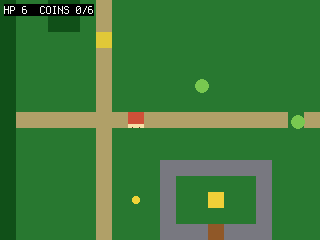 Slizy pronásledují hrdinu, ale pohybují se pomaleji a neprocházejí zdmi. Dotyk se slizem
ubere HP a spustí krátkou dobu nezranitelnosti. Tlačítkem B zaútočíš na dlaždici,
ke které je hrdina otočený. Stav HP ukazuje HUD; po jeho vyčerpání se vrátíš na začátek.
Uvidíš: přibližující se slizy, úbytek HP po zásahu a útok tlačítkem B. Tlačítko A dál
slouží k rozhovoru. Zkus: změň rychlost slizů nebo počáteční HP.
Slizy pronásledují hrdinu, ale pohybují se pomaleji a neprocházejí zdmi. Dotyk se slizem
ubere HP a spustí krátkou dobu nezranitelnosti. Tlačítkem B zaútočíš na dlaždici,
ke které je hrdina otočený. Stav HP ukazuje HUD; po jeho vyčerpání se vrátíš na začátek.
Uvidíš: přibližující se slizy, úbytek HP po zásahu a útok tlačítkem B. Tlačítko A dál
slouží k rozhovoru. Zkus: změň rychlost slizů nebo počáteční HP.
64 collapsed lines
# Quest -- step 7: enemies and bump combat.## What you learn: simple chasing AI, taking damage, and attacking. Slimes step# toward the hero (slower than you, and they respect walls via can_walk). Touching# one costs HP and starts a brief "can't be hurt again" cooldown (hurt_cooldown) so one touch doesn't# drain you instantly. Press B to swing: we defeat any slime in the tile just ahead# of the way you're facing. HP shows in the HUD; reaching 0 sends you back to start.## The State object from step 6 keeps paying off: HP, the hurt cooldown and a frame# counter just become more `st.` fields -- no new globals, no `global` soup.## New vs step 6: enemy sprites with chase AI, player HP + a brief hurt cooldown + knock-back,# a white hit-flash (sprite.flash) on damage, a B attack in the facing direction. (A still# talks to the NPC.)## Run: python3 sim/run.py tutorials/03-quest/step7_combat.py --hold B --shot /tmp/q7.png
import boardimport terminalioimport picogame as pgimport picogame_gameimport picogame_inputimport picogame_clockimport picogame_animimport picogame_shapes as shpimport picogame_ui as ui
W, H = picogame_game.screen() # never hardcode: the same game runs at 240x240 and 640x480TILE = 16SPEED = 2MAP = [ "##############################", "#.....:......................#", "#.....:........*.............#", "#..##.:.............~~~~~~...#", "#..##.:.............~~~~~~...#", "#.....N.............~~~~~~...#", "#.....:.......E.....~~~~~~...#", "#.....:......................#", "#.....:.....*.........*......#", "#.....:......................#", "#:::::::P:::::::::*::::::::::#", "#.....:...................*..#", "#.....:.............E........#", "#.....:...WWWWWWW............#", "#.....:...W.....W......##....#", "#.....:.*.W..G..W......##....#", "#.....:...W.....W........E...#", "#.....:...WWWDWWW............#", "#.....:......................#", "##############################",]MAPCOLS, MAPROWS = 30, 20# tile values (frame index into the colour tileset; 0 = empty)GRASS, PATH, WATER, TREE, WALL, DOOR, GOAL = 1, 2, 3, 4, 5, 6, 7CHAR2TILE = {".": GRASS, "P": GRASS, "N": GRASS, "*": GRASS, "E": GRASS, ":": PATH, "~": WATER, "#": TREE, "W": WALL, "D": DOOR, "G": GOAL}TILE_RGB = [(40, 120, 50), # GRASS (180, 160, 110), # PATH (40, 90, 200), # WATER (20, 80, 30), # TREE (120, 120, 130), # WALL (150, 90, 40), # DOOR (240, 210, 60)] # GOALSOLID = (WATER, TREE, WALL, DOOR) # these tiles block movementDOWN, UP, LEFT, RIGHT = 0, 1, 2, 3DIR = {DOWN: (0, 1), UP: (0, -1), LEFT: (-1, 0), RIGHT: (1, 0)} # facing -> (dx, dy) stepFACING_ANIM = ("down", "up", "side", "side") # animation per facing (left/right share the side art)EXPLORE, DIALOG = 0, 1 # game modes (int constants, not strings)WALK_FPS = 8 # walk-animation speed (frames per second)MAX_HP = 6HURT_FRAMES = 40 # ~1.3s of mercy after a hit (at 30 fps)FLASH_FRAMES = 3 # how long the white hit-flash showsBACKGROUND = pg.rgb565(0, 0, 0)WHITE = pg.rgb565(255, 255, 255)8 collapsed lines
NAVY = pg.rgb565(10, 10, 40)
# buffer_a/buffer_b = the engine's two shared render strips; immediate-mode draws# (the dialog box below) paint straight into buffer_ascene, buffer_a, buffer_b = picogame_game.setup(background=BACKGROUND)btn = picogame_input.Buttons()clock = picogame_clock.Clock(30)
tileset = shp.tileset_colors(TILE, TILE, [pg.rgb565(*color) for color in TILE_RGB])world = pg.Tilemap(tileset, MAPCOLS, MAPROWS)START = (TILE, TILE)npc_x, npc_y = TILE, TILEcoin_spots, enemy_spots = [], []for tile_y in range(MAPROWS): for tile_x in range(MAPCOLS): char = MAP[tile_y][tile_x] if tile_x < len(MAP[tile_y]) else "." world.set_tile(tile_x, tile_y, CHAR2TILE.get(char, GRASS)) if char == "P": START = (tile_x * TILE, tile_y * TILE) elif char == "N": npc_x, npc_y = tile_x * TILE, tile_y * TILE elif char == "*": coin_spots.append((tile_x * TILE, tile_y * TILE)) elif char == "E": enemy_spots.append((tile_x * TILE, tile_y * TILE))scene.add(world)
coin_bitmap = shp.circle(8, pg.rgb565(245, 215, 60))coins = [pg.Sprite(coin_bitmap, x + 4, y + 4) for (x, y) in coin_spots]for coin in coins: scene.add(coin)slime_bitmap = shp.circle(14, pg.rgb565(120, 200, 80))enemies = [pg.Sprite(slime_bitmap, x + 1, y + 1) for (x, y) in enemy_spots]for enemy in enemies: scene.add(enemy)npc = pg.Sprite(shp.rect(TILE, TILE, pg.rgb565(230, 200, 60)), npc_x, npc_y)scene.add(npc)116 collapsed lines
# --- the hero: ASCII pixel art you can edit. '#' = a pixel, '.' = transparent. One# colour = a 1-bit silhouette; the FACING reads from the shape: DOWN has eyes, UP is# the back of the head, SIDE is a profile with a nose (LEFT = SIDE mirrored at runtime# with flip_x). Two poses per facing make the walk -- the legs scissor between A and B.HERO_COLOR = pg.rgb565(235, 90, 70)DOWN_A = [ "................", ".....####.......", "....######......", "....######......", "....#.##.#......", # eye gaps -> the face "....######......", ".....####.......", "...########.....", "..##########....", "..##########....", "..##########....", "...########.....", "....##..##......", "...###..##......", "..###...##......", # left foot forward "..##............",]DOWN_B = [ "................", ".....####.......", "....######......", "....######......", "....#.##.#......", "....######......", ".....####.......", "...########.....", "..##########....", "..##########....", "..##########....", "...########.....", "....##..##......", "....##..###.....", "....##...###....", # right foot forward "..........##....",]UP_A = [ "................", ".....####.......", "....######......", "....######......", "....######......", # solid head = the hero's back "....######......", ".....####.......", "...########.....", "..##########....", "..##########....", "..##########....", "...########.....", "....##..##......", "...###..##......", "..###...##......", "..##............",]UP_B = [ "................", ".....####.......", "....######......", "....######......", "....######......", "....######......", ".....####.......", "...########.....", "..##########....", "..##########....", "..##########....", "...########.....", "....##..##......", "....##..###.....", "....##...###....", "..........##....",]SIDE_A = [ "................", ".....####.......", "....#####.......", "....######......", "....#####.#.....", # nose nub -> faces right (flip_x -> left) "....######......", ".....####.......", "....######......", "....######.#....", # arm swung forward "....######.#....", "....######......", ".....####.......", "...##....##.....", # legs split "..##......##....", "..##......##....", "..#........#....",]SIDE_B = [ "................", ".....####.......", "....#####.......", "....######......", "....#####.#.....", "....######......", ".....####.......", "....######......", "....######......", # arm tucked in "....######......", "....######......", ".....####.......", ".....####.......", # legs pass under the body ".....####.......", "....##..##......", "....#....#......",]BM = {"down": [shp.from_mask(DOWN_A, HERO_COLOR), shp.from_mask(DOWN_B, HERO_COLOR)], "up": [shp.from_mask(UP_A, HERO_COLOR), shp.from_mask(UP_B, HERO_COLOR)], "side": [shp.from_mask(SIDE_A, HERO_COLOR), shp.from_mask(SIDE_B, HERO_COLOR)]}hero = pg.Sprite(BM["down"][0], START[0], START[1])walk = picogame_anim.AnimatedSprite(hero, { "down": (BM["down"], WALK_FPS, True), "up": (BM["up"], WALK_FPS, True), "side": (BM["side"], WALK_FPS, True)})scene.add(hero)hud = ui.SceneLabel(scene, pg, terminalio.FONT, 4, 4, WHITE, BACKGROUND)dialog = ui.TextBox(pg, terminalio.FONT, 8, H - 64, W - 16, 58, WHITE, NAVY, maxlines=4)LINES = ["Villager:", "Slimes ahead! Press B to", "swing at them.", "(press A)"]
class State: """All the mutable game variables in one place (grows as the game does). __init__ calls reset().""" def __init__(self): self.reset()
def reset(self): self.facing = DOWN self.coins = 0 self.hp = MAX_HP self.hurt_cooldown = 0 # frames of mercy after a hit (i-frames) self.mode = EXPLORE # EXPLORE = walking around, DIALOG = talking self.frame_count = 0 # frames elapsed (slimes chase every other frame) self.dlg_shown = False # draw the modal once, not every frame
13 collapsed lines
st = State()
def solid_at(pixel_x, pixel_y): tile_x, tile_y = pixel_x // TILE, pixel_y // TILE if tile_x < 0 or tile_x >= MAPCOLS or tile_y < 0 or tile_y >= MAPROWS: return True return world.get_tile(tile_x, tile_y) in SOLID
def can_walk(pixel_x, pixel_y): return not (solid_at(pixel_x + 2, pixel_y + 2) or solid_at(pixel_x + TILE - 3, pixel_y + 2) or solid_at(pixel_x + 2, pixel_y + TILE - 3) or solid_at(pixel_x + TILE - 3, pixel_y + TILE - 3))
def near(a, bx, by, d=TILE): # True if sprite a is within d px of the point (bx, by) on both axes (a box test) return abs(a.x - bx) < d and abs(a.y - by) < d
5 collapsed lines
def camera_follow(): offset_x = max(W - MAPCOLS * TILE, min(0, W // 2 - (hero.x + TILE // 2))) offset_y = max(H - MAPROWS * TILE, min(0, H // 2 - (hero.y + TILE // 2))) scene.set_view(int(offset_x), int(offset_y))
camera_follow()def main(): # loop in a function -> its names are fast locals (see step 6) dt = 1 / 30 # seed the first frame; re-set from clock.tick() each loop while True: btn.poll() st.frame_count += 1
if st.mode == DIALOG: if not st.dlg_shown: # draw ONCE -> no per-frame flicker scene.refresh() dialog.draw(scene.display, buffer_a, LINES) st.dlg_shown = True if btn.just_pressed(btn.A) or btn.just_pressed(btn.B): st.mode = EXPLORE scene.invalidate() clock.tick() continue13 collapsed lines
delta_x = btn.is_pressed(btn.RIGHT) - btn.is_pressed(btn.LEFT) delta_y = btn.is_pressed(btn.DOWN) - btn.is_pressed(btn.UP) if delta_x: st.facing = RIGHT if delta_x > 0 else LEFT elif delta_y: st.facing = DOWN if delta_y > 0 else UP hero.flip_x = (st.facing == LEFT) # mirror the side art for LEFT moved = False if delta_x and can_walk(hero.x + delta_x * SPEED, hero.y): hero.move(hero.x + delta_x * SPEED, hero.y); moved = True if delta_y and can_walk(hero.x, hero.y + delta_y * SPEED): hero.move(hero.x, hero.y + delta_y * SPEED); moved = True if moved: camera_follow() walk.play(FACING_ANIM[st.facing]) walk.tick(dt) else: hero.bitmap = BM[FACING_ANIM[st.facing]][0] # still: pose A of the current facing
# attack: defeat a slime in the tile ahead of the facing if btn.just_pressed(btn.B): ddx, ddy = DIR[st.facing] ax, ay = hero.x + ddx * TILE, hero.y + ddy * TILE for enemy in enemies: if enemy.visible and abs(enemy.x - ax) < TILE and abs(enemy.y - ay) < TILE: enemy.visible = False
# slimes chase (slower: move every other frame) and respect walls if st.frame_count % 2 == 0: for enemy in enemies: if not enemy.visible: continue # which way to the hero: -1, 0 or +1 per axis (a compact sign()) chase_dx = (hero.x > enemy.x) - (hero.x < enemy.x) chase_dy = (hero.y > enemy.y) - (hero.y < enemy.y) if chase_dx and can_walk(enemy.x + chase_dx, enemy.y): enemy.move(enemy.x + chase_dx, enemy.y) if chase_dy and can_walk(enemy.x, enemy.y + chase_dy): enemy.move(enemy.x, enemy.y + chase_dy)
# take damage on contact (unless the cooldown from the last hit is still running) if st.hurt_cooldown > 0: st.hurt_cooldown -= 1 # count the "safe" frames down if st.hurt_cooldown == HURT_FRAMES - FLASH_FRAMES: # ...and end the hit-flash after 3 frames hero.flash = None else: for enemy in enemies: # 13px: slime radius (~7) + hero half-width (~8), i.e. they're touching if enemy.visible and near(enemy, hero.x, hero.y, 13): st.hp -= 1 st.hurt_cooldown = HURT_FRAMES # frames where another touch can't hurt you hero.flash = WHITE # white blit-flash for 3 frames: "I got hit" if st.hp <= 0: # down -> back to start, full HP st.hp = MAX_HP hero.move(START[0], START[1]) camera_follow() break
# pick up any coin we're standing on (within ~12px on both axes = close enough) for coin in coins: if coin.visible and abs(hero.x - coin.x) < 12 and abs(hero.y - coin.y) < 12: coin.visible = False st.coins += 1
# Adjacency is enough here: A's other role (swing) is harmless beside the NPC. A game # where that clashes gates the talk on facing too (st.facing points at the NPC). if near(hero, npc.x, npc.y): hud.set("HP %d COINS %d/%d A:TALK B:SWING" % (st.hp, st.coins, len(coins))) if btn.just_pressed(btn.A): st.mode = DIALOG st.dlg_shown = False else: hud.set("HP %d COINS %d/%d" % (st.hp, st.coins, len(coins)))
scene.refresh() dt = clock.tick()
main()Krok 8 — step8_quest.py · dokončení úkolu
Sekce “Krok 8 — step8_quest.py · dokončení úkolu”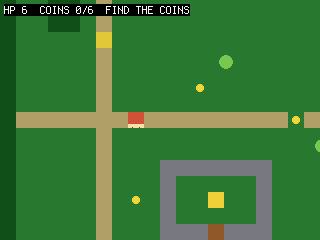 Předchozí mechaniky teď spojíme do jednoho cíle. NPC chce všechny mince; po jejich
odevzdání další rozhovor otevře dveře. Dlaždice dveří přepíšeme na cestu, takže přes ně
projde i kontrola kolizí. Vstup na dlaždici svatyně dokončí hru. Pole
Předchozí mechaniky teď spojíme do jednoho cíle. NPC chce všechny mince; po jejich
odevzdání další rozhovor otevře dveře. Dlaždice dveří přepíšeme na cestu, takže přes ně
projde i kontrola kolizí. Vstup na dlaždici svatyně dokončí hru. Pole st.stage řídí text
dialogu i stav dveří a režim získá třetí hodnotu WON. Funkce dialog_lines(st) přijímá
stav jako argument místo čtení globálních proměnných. Uvidíš: rozhovor → sbírání →
odemčení dveří → svatyně → „QUEST COMPLETE“. Zkus: otevřít dveře až po poražení všech
slizů.
73 collapsed lines
# Quest -- step 8: a quest, a goal, and a win state (capstone).## What you learn: tying the systems into an actual game. The NPC gives an objective# (collect every coin); once you have them all, talking again OPENS the door (we# rewrite those tiles from "door" to "path", so collision lets you through); stepping# on the shrine tile wins. A small quest-stage variable drives the dialog text and# the door. This is the whole loop: talk -> collect -> unlock -> reach the goal.## The State object now carries the whole game: hp, coins, the quest stage, and the# mode (EXPLORE/DIALOG/WON). dialog_lines() TAKES the state (dialog_lines(st)) instead# of reaching for globals -- the tidy payoff of grouping state in one object.## New vs step 7: a quest stage, objective-driven dialog, opening the door by editing# tiles, a goal tile + WON state, and sound (a talk blip + a win chime).## BIG PICTURE: you've now hand-built an RPG -- map, camera, collision, animation,# items, NPC, combat, quest. You DON'T have to keep hand-coding maps like this: the# editor (editor/) lets you paint the map, place the hero/NPC/coins, and FLAG tiles# (solid/coin/goal) visually, then the picogame_scene loader builds the scene for# you -- the exact things this file does by hand become data. See tutorials/README.md# and examples/picogame_platformer_scene.py for a game whose level is loaded that way.## Run: python3 sim/run.py tutorials/03-quest/step8_quest.py --shot /tmp/q8.png
import boardimport terminalioimport picogame as pgimport picogame_gameimport picogame_inputimport picogame_clockimport picogame_animimport picogame_shapes as shpimport picogame_ui as ui
W, H = picogame_game.screen() # never hardcode: the same game runs at 240x240 and 640x480TILE = 16SPEED = 2MAP = [ "##############################", "#.....:......................#", "#.....:........*.............#", "#..##.:.............~~~~~~...#", "#..##.:.............~~~~~~...#", "#.....N.............~~~~~~...#", "#.....:.......E.....~~~~~~...#", "#.....:......................#", "#.....:.....*.........*......#", "#.....:......................#", "#:::::::P:::::::::*::::::::::#", "#.....:...................*..#", "#.....:.............E........#", "#.....:...WWWWWWW............#", "#.....:...W.....W......##....#", "#.....:.*.W..G..W......##....#", "#.....:...W.....W........E...#", "#.....:...WWWDWWW............#", "#.....:......................#", "##############################",]MAPCOLS, MAPROWS = 30, 20# tile values (frame index into the colour tileset; 0 = empty)GRASS, PATH, WATER, TREE, WALL, DOOR, GOAL = 1, 2, 3, 4, 5, 6, 7CHAR2TILE = {".": GRASS, "P": GRASS, "N": GRASS, "*": GRASS, "E": GRASS, ":": PATH, "~": WATER, "#": TREE, "W": WALL, "D": DOOR, "G": GOAL}TILE_RGB = [(40, 120, 50), # GRASS (180, 160, 110), # PATH (40, 90, 200), # WATER (20, 80, 30), # TREE (120, 120, 130), # WALL (150, 90, 40), # DOOR (240, 210, 60)] # GOALSOLID = (WATER, TREE, WALL, DOOR) # these tiles block movementDOWN, UP, LEFT, RIGHT = 0, 1, 2, 3DIR = {DOWN: (0, 1), UP: (0, -1), LEFT: (-1, 0), RIGHT: (1, 0)} # facing -> (dx, dy) stepFACING_ANIM = ("down", "up", "side", "side") # animation per facing (left/right share the side art)EXPLORE, DIALOG, WON = 0, 1, 2 # game modes (int constants, not strings)WALK_FPS = 8 # walk-animation speed (frames per second)MAX_HP = 65 collapsed lines
HURT_FRAMES = 40 # ~1.3s of mercy after a hit (at 30 fps)FLASH_FRAMES = 3 # how long the white hit-flash showsBACKGROUND = pg.rgb565(0, 0, 0)WHITE = pg.rgb565(255, 255, 255)NAVY = pg.rgb565(10, 10, 40)
# buffer_a/buffer_b = the engine's two shared render strips; immediate-mode draws# (the dialog/win box below) paint straight into buffer_ascene, buffer_a, buffer_b = picogame_game.setup(background=BACKGROUND)btn = picogame_input.Buttons()clock = picogame_clock.Clock(30)
# optional audio: a talk blip + a bright win chime (no asset needed). None if no backend.try: import picogame_audio audio = picogame_audio.Audio() snd_talk = picogame_audio.tone(520, 30) # short blip on dialog advance snd_win = picogame_audio.tone(880, 220) # bright chime on QUEST COMPLETEexcept Exception: audio = None snd_talk = snd_win = None
tileset = shp.tileset_colors(TILE, TILE, [pg.rgb565(*color) for color in TILE_RGB])world = pg.Tilemap(tileset, MAPCOLS, MAPROWS)START = (TILE, TILE)npc_x, npc_y = TILE, TILEcoin_spots, enemy_spots, door_tiles = [], [], []for tile_y in range(MAPROWS): for tile_x in range(MAPCOLS):8 collapsed lines
char = MAP[tile_y][tile_x] if tile_x < len(MAP[tile_y]) else "." world.set_tile(tile_x, tile_y, CHAR2TILE.get(char, GRASS)) if char == "P": START = (tile_x * TILE, tile_y * TILE) elif char == "N": npc_x, npc_y = tile_x * TILE, tile_y * TILE elif char == "*": coin_spots.append((tile_x * TILE, tile_y * TILE)) elif char == "E": enemy_spots.append((tile_x * TILE, tile_y * TILE)) elif char == "D": door_tiles.append((tile_x, tile_y))scene.add(world)
134 collapsed lines
coin_bitmap = shp.circle(8, pg.rgb565(245, 215, 60))coins = [pg.Sprite(coin_bitmap, x + 4, y + 4) for (x, y) in coin_spots]for coin in coins: scene.add(coin)slime_bitmap = shp.circle(14, pg.rgb565(120, 200, 80))enemies = [pg.Sprite(slime_bitmap, x + 1, y + 1) for (x, y) in enemy_spots]for enemy in enemies: scene.add(enemy)npc = pg.Sprite(shp.rect(TILE, TILE, pg.rgb565(230, 200, 60)), npc_x, npc_y)scene.add(npc)
# --- the hero: ASCII pixel art you can edit. '#' = a pixel, '.' = transparent. One# colour = a 1-bit silhouette; the FACING reads from the shape: DOWN has eyes, UP is# the back of the head, SIDE is a profile with a nose (LEFT = SIDE mirrored at runtime# with flip_x). Two poses per facing make the walk -- the legs scissor between A and B.HERO_COLOR = pg.rgb565(235, 90, 70)DOWN_A = [ "................", ".....####.......", "....######......", "....######......", "....#.##.#......", # eye gaps -> the face "....######......", ".....####.......", "...########.....", "..##########....", "..##########....", "..##########....", "...########.....", "....##..##......", "...###..##......", "..###...##......", # left foot forward "..##............",]DOWN_B = [ "................", ".....####.......", "....######......", "....######......", "....#.##.#......", "....######......", ".....####.......", "...########.....", "..##########....", "..##########....", "..##########....", "...########.....", "....##..##......", "....##..###.....", "....##...###....", # right foot forward "..........##....",]UP_A = [ "................", ".....####.......", "....######......", "....######......", "....######......", # solid head = the hero's back "....######......", ".....####.......", "...########.....", "..##########....", "..##########....", "..##########....", "...########.....", "....##..##......", "...###..##......", "..###...##......", "..##............",]UP_B = [ "................", ".....####.......", "....######......", "....######......", "....######......", "....######......", ".....####.......", "...########.....", "..##########....", "..##########....", "..##########....", "...########.....", "....##..##......", "....##..###.....", "....##...###....", "..........##....",]SIDE_A = [ "................", ".....####.......", "....#####.......", "....######......", "....#####.#.....", # nose nub -> faces right (flip_x -> left) "....######......", ".....####.......", "....######......", "....######.#....", # arm swung forward "....######.#....", "....######......", ".....####.......", "...##....##.....", # legs split "..##......##....", "..##......##....", "..#........#....",]SIDE_B = [ "................", ".....####.......", "....#####.......", "....######......", "....#####.#.....", "....######......", ".....####.......", "....######......", "....######......", # arm tucked in "....######......", "....######......", ".....####.......", ".....####.......", # legs pass under the body ".....####.......", "....##..##......", "....#....#......",]BM = {"down": [shp.from_mask(DOWN_A, HERO_COLOR), shp.from_mask(DOWN_B, HERO_COLOR)], "up": [shp.from_mask(UP_A, HERO_COLOR), shp.from_mask(UP_B, HERO_COLOR)], "side": [shp.from_mask(SIDE_A, HERO_COLOR), shp.from_mask(SIDE_B, HERO_COLOR)]}hero = pg.Sprite(BM["down"][0], START[0], START[1])walk = picogame_anim.AnimatedSprite(hero, { "down": (BM["down"], WALK_FPS, True), "up": (BM["up"], WALK_FPS, True), "side": (BM["side"], WALK_FPS, True)})scene.add(hero)hud = ui.SceneLabel(scene, pg, terminalio.FONT, 4, 4, WHITE, BACKGROUND)dialog = ui.TextBox(pg, terminalio.FONT, 8, H - 64, W - 16, 58, WHITE, NAVY, maxlines=4)NUMCOINS = len(coins)
class State: """The whole game's mutable state -- one object, passed where a function needs it. __init__ calls reset().""" def __init__(self): self.reset()
def reset(self): self.facing = DOWN self.coins = 0 self.hp = MAX_HP self.hurt_cooldown = 0 self.stage = 0 # 0 not started, 1 collecting, 2 door open self.mode = EXPLORE # EXPLORE / DIALOG / WON self.frame_count = 0 # frames elapsed (slimes chase every other frame) self.overlay_shown = False # draw dialog/win modal once, not every frame
24 collapsed lines
st = State()
def solid_at(pixel_x, pixel_y): tile_x, tile_y = pixel_x // TILE, pixel_y // TILE if tile_x < 0 or tile_x >= MAPCOLS or tile_y < 0 or tile_y >= MAPROWS: return True return world.get_tile(tile_x, tile_y) in SOLID
def can_walk(pixel_x, pixel_y): return not (solid_at(pixel_x + 2, pixel_y + 2) or solid_at(pixel_x + TILE - 3, pixel_y + 2) or solid_at(pixel_x + 2, pixel_y + TILE - 3) or solid_at(pixel_x + TILE - 3, pixel_y + TILE - 3))
def near(a, bx, by, d=TILE): # True if sprite a is within d px of the point (bx, by) on both axes (a box test) return abs(a.x - bx) < d and abs(a.y - by) < d
def camera_follow(): offset_x = max(W - MAPCOLS * TILE, min(0, W // 2 - (hero.x + TILE // 2))) offset_y = max(H - MAPROWS * TILE, min(0, H // 2 - (hero.y + TILE // 2))) scene.set_view(int(offset_x), int(offset_y))
def dialog_lines(st): if st.stage == 0: return ["Villager:", "Bring me all %d coins and" % NUMCOINS, "I'll open the shrine door.", "(press A)"] if st.stage == 1 and st.coins < NUMCOINS: return ["Villager:", "You have %d of %d coins." % (st.coins, NUMCOINS), "Keep looking!", "(press A)"] return ["Villager:", "The door is open.", "Seek the shrine within.", "(press A)"]
def open_door(): for (tile_x, tile_y) in door_tiles: world.set_tile(tile_x, tile_y, PATH) # door -> path (no longer SOLID) scene.invalidate()
camera_follow()def main(): # loop in a function -> its names are fast locals (see step 6) dt = 1 / 30 # seed the first frame; re-set from clock.tick() each loop while True: btn.poll() st.frame_count += 1
if st.mode == WON: if not st.overlay_shown: # draw ONCE -> no per-frame flicker scene.refresh() dialog.draw(scene.display, buffer_a, ["You reached the shrine!", "", "QUEST COMPLETE", "(press A)"]) if audio: audio.sfx(snd_win) # bright chime on the win st.overlay_shown = True if btn.just_pressed(btn.A): st.mode = EXPLORE scene.invalidate() clock.tick() continue
if st.mode == DIALOG: if not st.overlay_shown: # draw ONCE -> no per-frame flicker scene.refresh() dialog.draw(scene.display, buffer_a, dialog_lines(st)) st.overlay_shown = True if btn.just_pressed(btn.A) or btn.just_pressed(btn.B): if audio: audio.sfx(snd_talk) # blip on dialog advance if st.stage == 0: st.stage = 1 elif st.stage == 1 and st.coins >= NUMCOINS: st.stage = 2 open_door() st.mode = EXPLORE scene.invalidate()40 collapsed lines
clock.tick() continue
delta_x = btn.is_pressed(btn.RIGHT) - btn.is_pressed(btn.LEFT) delta_y = btn.is_pressed(btn.DOWN) - btn.is_pressed(btn.UP) if delta_x: st.facing = RIGHT if delta_x > 0 else LEFT elif delta_y: st.facing = DOWN if delta_y > 0 else UP hero.flip_x = (st.facing == LEFT) # mirror the side art for LEFT moved = False if delta_x and can_walk(hero.x + delta_x * SPEED, hero.y): hero.move(hero.x + delta_x * SPEED, hero.y); moved = True if delta_y and can_walk(hero.x, hero.y + delta_y * SPEED): hero.move(hero.x, hero.y + delta_y * SPEED); moved = True if moved: camera_follow() walk.play(FACING_ANIM[st.facing]) walk.tick(dt) else: hero.bitmap = BM[FACING_ANIM[st.facing]][0] # still: pose A of the current facing
if btn.just_pressed(btn.B): ddx, ddy = DIR[st.facing] ax, ay = hero.x + ddx * TILE, hero.y + ddy * TILE for enemy in enemies: if enemy.visible and abs(enemy.x - ax) < TILE and abs(enemy.y - ay) < TILE: enemy.visible = False
if st.frame_count % 2 == 0: for enemy in enemies: if not enemy.visible: continue # which way to the hero: -1, 0 or +1 per axis (a compact sign()) chase_dx = (hero.x > enemy.x) - (hero.x < enemy.x) chase_dy = (hero.y > enemy.y) - (hero.y < enemy.y) if chase_dx and can_walk(enemy.x + chase_dx, enemy.y): enemy.move(enemy.x + chase_dx, enemy.y) if chase_dy and can_walk(enemy.x, enemy.y + chase_dy): enemy.move(enemy.x, enemy.y + chase_dy)
if st.hurt_cooldown > 0: st.hurt_cooldown -= 1 if st.hurt_cooldown == HURT_FRAMES - FLASH_FRAMES: # end the hit-flash after 3 frames hero.flash = None else: for enemy in enemies: # 13px: slime radius (~7) + hero half-width (~8), i.e. they're touching if enemy.visible and near(enemy, hero.x, hero.y, 13): st.hp -= 1 st.hurt_cooldown = HURT_FRAMES hero.flash = WHITE # white hit-flash on damage if st.hp <= 0: st.hp = MAX_HP hero.move(START[0], START[1])7 collapsed lines
camera_follow() break
# pick up any coin we're standing on (within ~12px on both axes = close enough) for coin in coins: if coin.visible and abs(hero.x - coin.x) < 12 and abs(hero.y - coin.y) < 12: coin.visible = False st.coins += 1
# reach the shrine (goal tile) once the door is open if st.stage >= 2: # the tile under the hero's centre center_tile_x = (hero.x + TILE // 2) // TILE center_tile_y = (hero.y + TILE // 2) // TILE if world.get_tile(center_tile_x, center_tile_y) == GOAL: st.mode = WON st.overlay_shown = False
# Adjacency is enough here: A's other role (swing) is harmless beside the NPC. A game # where that clashes gates the talk on facing too (st.facing points at the NPC). if near(hero, npc.x, npc.y): hud.set("HP %d COINS %d/%d A:TALK" % (st.hp, st.coins, NUMCOINS)) if btn.just_pressed(btn.A): st.mode = DIALOG st.overlay_shown = False else: if st.stage < 1 or st.coins < NUMCOINS: objective = "FIND THE COINS" elif st.stage >= 2: objective = "DOOR OPEN!" else: objective = "RETURN TO NPC" hud.set("HP %d COINS %d/%d %s" % (st.hp, st.coins, NUMCOINS, objective))
scene.refresh() dt = clock.tick()
main()Teď máš malé hratelné RPG. Mapy ale nemusíš dál zapisovat ručně. Ve
webovém editoru můžeš mapu nakreslit, rozmístit hrdinu, NPC a mince a
označit význam dlaždic (solid, coin, goal). Modul picogame_scene pak tato data
načte. Strukturu popisuje formát scény; úplný příklad najdeš v
examples/picogame_scene_example.py.
Odsud rozjeď vlastní hru. Postavil jsi tři hry ručně — tady je znovupoužitelný tvar, ze kterého
začneš každou další: vzor State + main() (Herní vzory) a hotová
kostra hry (Úryvky, nebo ji otevři v
Playgroundu). Nasyp do toho rámce vlastní grafiku, dlaždice
a pravidla a jedeš.