Tutorial 3 — Quest
In this tutorial, you’ll build a small top-down RPG: walk through a scrolling map, collect coins, talk to an NPC, fight slimes, and complete a quest. It assumes you’ve completed 01-bounce and 02-starship. The main new ideas are the camera and using a tilemap as the world.
The full source for this tutorial lives on GitHub: tutorials/03-quest.
Run any step:
python3 sim/run.py tutorials/03-quest/stepN_name.py --hold DOWN --shot /tmp/out.pngTip: use --backend pygame for steps 6–8 if you want to interact with the dialog and quest.
step 1 — step1_world.py · a world bigger than the screen
Section titled “step 1 — step1_world.py · a world bigger than the screen”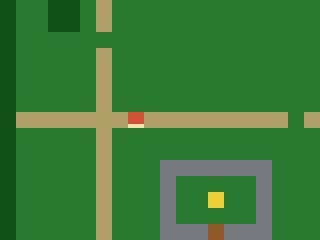
picogame_game.setup(...) returns (scene, buffer_a, buffer_b).
On an SPI display, the last two values are reusable strip buffers; on a framebuffer display,
they are None. Early steps only need the Scene and ignore the other two
values (scene, _, _). Later dialog steps pass buffer_a to an immediate-mode helper; the
framebuffer renderer does not need it. An ASCII map
becomes a Tilemap (30×20 tiles = 480×320 px, larger than the 320×240
screen). shp.tileset_colors builds the tileset (grass/path/water/tree/wall/door/goal).
The hero is a Sprite whose look comes from a Bitmap — for now a
placeholder: a red square with a brighter facing edge so you can see which way it points.
Step 4 replaces it with a character assembled from ASCII masks.
scene.set_view(offset_x, offset_y) chooses the visible window; that’s the camera. The hero
lives in world coordinates; the view offset decides where it lands on screen. You see: a
patch of world with the hero centred. Try it: edit the MAP strings.
# Quest -- step 1: a world bigger than the screen.## This third tutorial builds a top-down RPG. It teaches what Bounce and Starship# couldn't: a scrolling world larger than the display, a camera that follows the# hero, tile-based wall collision, a walk animation, items, an NPC you talk to, and# light combat. Do 01-bounce and 02-starship first.## What you learn here: a Tilemap can be a whole WORLD (30x20 tiles = 480x320 px,# bigger than the 320x240 screen). scene.set_view(offset_x, offset_y) chooses which part of the# world is on screen -- that's the camera. We centre it on the hero. The hero lives# in WORLD coordinates; the view offset decides where that lands on screen.## New: a large Tilemap from an ASCII map, shp.tileset_colors, scene.set_view, and a# placeholder hero (a red square with a facing edge). Step 4 gives it real drawn art.## Run:  python3 sim/run.py tutorials/03-quest/step1_world.py --shot /tmp/q1.png
import arrayimport picogame as pgimport picogame_gameimport picogame_clockimport picogame_shapes as shp
W, H = picogame_game.screen()   # never hardcode: the same game runs at 240x240 and 640x480TILE = 1638 collapsed lines
# . grass  : path  ~ water(solid)  # tree(solid)  W wall(solid)  D door  G goal# P player  N npc  * coin  E enemyMAP = [    "##############################",    "#.....:......................#",    "#.....:........*.............#",    "#..##.:.............~~~~~~...#",    "#..##.:.............~~~~~~...#",    "#.....N.............~~~~~~...#",    "#.....:.......E.....~~~~~~...#",    "#.....:......................#",    "#.....:.....*.........*......#",    "#.....:......................#",    "#:::::::P:::::::::*::::::::::#",    "#.....:...................*..#",    "#.....:.............E........#",    "#.....:...WWWWWWW............#",    "#.....:...W.....W......##....#",    "#.....:.*.W..G..W......##....#",    "#.....:...W.....W........E...#",    "#.....:...WWWDWWW............#",    "#.....:......................#",    "##############################",]MAPCOLS, MAPROWS = 30, 20# map char -> tile value (entities sit on grass; the tile under them is grass/path)# tile values (frame index into the colour tileset; 0 = empty)GRASS, PATH, WATER, TREE, WALL, DOOR, GOAL = 1, 2, 3, 4, 5, 6, 7CHAR2TILE = {".": GRASS, "P": GRASS, "N": GRASS, "*": GRASS, "E": GRASS,             ":": PATH, "~": WATER, "#": TREE, "W": WALL, "D": DOOR, "G": GOAL}# tile colours for values 1..7 (value 0 is unused)TILE_RGB = [(40, 120, 50),    # GRASS            (180, 160, 110),  # PATH            (40, 90, 200),    # WATER            (20, 80, 30),     # TREE            (120, 120, 130),  # WALL            (150, 90, 40),    # DOOR            (240, 210, 60)]   # GOAL
scene, _, _ = picogame_game.setup(background=pg.rgb565(0, 0, 0))clock = picogame_clock.Clock(30)
tileset = shp.tileset_colors(TILE, TILE, [pg.rgb565(*color) for color in TILE_RGB])world = pg.Tilemap(tileset, MAPCOLS, MAPROWS)hero_x, hero_y = TILE, TILE                   # world pixel position of the hero# build the Tilemap cell by cell from the ASCII map abovefor tile_y in range(MAPROWS):    row = MAP[tile_y]    for tile_x in range(MAPCOLS):        char = row[tile_x] if tile_x < len(row) else "."   # rows are full width; "." is just a safety net        world.set_tile(tile_x, tile_y, CHAR2TILE.get(char, GRASS))   # unknown chars fall back to GRASS        if char == "P":            hero_x, hero_y = tile_x * TILE, tile_y * TILEscene.add(world)

# a PLACEHOLDER hero: a plain red square with a brighter bar on the facing edge, so you# can see which way it points. 4 frames = 4 directions (frame = facing). We prototype# with a shape now and draw a real animated character in step 4.RED = pg.rgb565(210, 80, 60)EDGE = pg.rgb565(255, 225, 170)

def hero_bitmap():    palette = array.array("H", [pg.rgb565(0, 0, 0), RED, EDGE])   # index 0 = transparent    stride = TILE * 4                                             # 4 frames side by side, 1 byte/px    data = bytearray(stride * TILE)    for facing in range(4):                                       # 0 down, 1 up, 2 left, 3 right        for y in range(TILE):            for x in range(TILE):                on_facing_edge = ((facing == 0 and y >= TILE - 3) or (facing == 1 and y < 3) or                                  (facing == 2 and x < 3) or (facing == 3 and x >= TILE - 3))                data[y * stride + facing * TILE + x] = 2 if on_facing_edge else 1    return pg.Bitmap(data, TILE, TILE, format=pg.PAL8, palette=palette, frames=4, stride=stride)

hero = pg.Sprite(hero_bitmap(), hero_x, hero_y, frame=0)scene.add(hero)

def camera_follow():    # centre the camera on the hero, clamped so we never show past the world edges    # The view offset = how far the world is shifted left/up on screen: 0 (world edge    # at screen edge) down to negative as we scroll right/down.    offset_x = W // 2 - (hero.x + TILE // 2)          # centre the hero...    offset_x = min(0, offset_x)                       # ...but never past the left edge    offset_x = max(W - MAPCOLS * TILE, offset_x)      # ...nor past the right edge    offset_y = H // 2 - (hero.y + TILE // 2)          # centre the hero...    offset_y = min(0, offset_y)                       # ...but never past the top edge    offset_y = max(H - MAPROWS * TILE, offset_y)      # ...nor past the bottom edge    scene.set_view(int(offset_x), int(offset_y))

camera_follow()while True: scene.refresh() clock.tick()step 2 — step2_walk.py · walk, camera follows
Section titled “step 2 — step2_walk.py · walk, camera follows”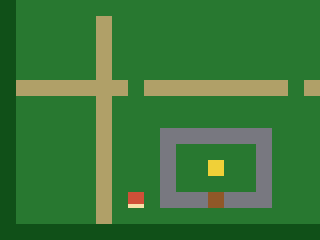 4-direction movement read with
 picogame_input; after each move camera_follow() re-centres the camera, clamped to the
world so you never see past the edges (near an edge the hero walks toward the screen edge
instead). The hero faces its movement direction — its frame picks down/up/left/right. No wall collision yet:
you can walk over water. You see: the hero strides around with the camera following, clamped so the view never slips past the world’s edge. Try it: change SPEED.
14 collapsed lines
# Quest -- step 2: walk around, camera follows.## What you learn: world vs screen coordinates. The hero moves in WORLD space; after# each move we call camera_follow() to re-aim the camera. Near the world edges the clamp in# camera_follow() stops the camera and the hero walks toward the screen edge instead -- the# classic top-down feel. The hero also FACES the way it moves -- its `frame` picks the# direction (0 down, 1 up, 2 left, 3 right). There's no wall collision yet, so you can# walk over water and trees (step 3 fixes that).## New vs step 1: 4-direction input, facing via sprite.frame, camera_follow() on move.## Run: python3 sim/run.py tutorials/03-quest/step2_walk.py --hold DOWN --shot /tmp/q2.png
import arrayimport picogame as pgimport picogame_gameimport picogame_inputimport picogame_clockimport picogame_shapes as shp
W, H = picogame_game.screen() # never hardcode: the same game runs at 240x240 and 640x480TILE = 16SPEED = 2MAP = [ "##############################",30 collapsed lines
"#.....:......................#", "#.....:........*.............#", "#..##.:.............~~~~~~...#", "#..##.:.............~~~~~~...#", "#.....N.............~~~~~~...#", "#.....:.......E.....~~~~~~...#", "#.....:......................#", "#.....:.....*.........*......#", "#.....:......................#", "#:::::::P:::::::::*::::::::::#", "#.....:...................*..#", "#.....:.............E........#", "#.....:...WWWWWWW............#", "#.....:...W.....W......##....#", "#.....:.*.W..G..W......##....#", "#.....:...W.....W........E...#", "#.....:...WWWDWWW............#", "#.....:......................#", "##############################",]MAPCOLS, MAPROWS = 30, 20# tile values (frame index into the colour tileset; 0 = empty)GRASS, PATH, WATER, TREE, WALL, DOOR, GOAL = 1, 2, 3, 4, 5, 6, 7CHAR2TILE = {".": GRASS, "P": GRASS, "N": GRASS, "*": GRASS, "E": GRASS, ":": PATH, "~": WATER, "#": TREE, "W": WALL, "D": DOOR, "G": GOAL}TILE_RGB = [(40, 120, 50), # GRASS (180, 160, 110), # PATH (40, 90, 200), # WATER (20, 80, 30), # TREE (120, 120, 130), # WALL (150, 90, 40), # DOOR (240, 210, 60)] # GOALDOWN, UP, LEFT, RIGHT = 0, 1, 2, 3 # facing -> frame index
scene, _, _ = picogame_game.setup(background=pg.rgb565(0, 0, 0))btn = picogame_input.Buttons()clock = picogame_clock.Clock(30)
tileset = shp.tileset_colors(TILE, TILE, [pg.rgb565(*color) for color in TILE_RGB])world = pg.Tilemap(tileset, MAPCOLS, MAPROWS)hero_x, hero_y = TILE, TILEfor tile_y in range(MAPROWS): for tile_x in range(MAPCOLS): char = MAP[tile_y][tile_x] if tile_x < len(MAP[tile_y]) else "." world.set_tile(tile_x, tile_y, CHAR2TILE.get(char, GRASS)) if char == "P": hero_x, hero_y = tile_x * TILE, tile_y * TILEscene.add(world)
# a PLACEHOLDER hero: a plain red square with a brighter bar on the facing edge, so you# can see which way it points. 4 frames = 4 directions (frame = facing). Step 4 replaces# it with a real drawn character.RED = pg.rgb565(210, 80, 60)EDGE = pg.rgb565(255, 225, 170)13 collapsed lines
def hero_bitmap(): palette = array.array("H", [pg.rgb565(0, 0, 0), RED, EDGE]) # index 0 = transparent stride = TILE * 4 # 4 frames side by side, 1 byte/px data = bytearray(stride * TILE) for facing in range(4): # 0 down, 1 up, 2 left, 3 right for y in range(TILE): for x in range(TILE): on_facing_edge = ((facing == 0 and y >= TILE - 3) or (facing == 1 and y < 3) or (facing == 2 and x < 3) or (facing == 3 and x >= TILE - 3)) data[y * stride + facing * TILE + x] = 2 if on_facing_edge else 1 return pg.Bitmap(data, TILE, TILE, format=pg.PAL8, palette=palette, frames=4, stride=stride)
hero = pg.Sprite(hero_bitmap(), hero_x, hero_y, frame=DOWN)scene.add(hero)
def camera_follow(): offset_x = max(W - MAPCOLS * TILE, min(0, W // 2 - (hero.x + TILE // 2))) offset_y = max(H - MAPROWS * TILE, min(0, H // 2 - (hero.y + TILE // 2))) scene.set_view(int(offset_x), int(offset_y))
camera_follow()while True: btn.poll() # True/False count as 1/0, so this is -1 (left), 0, or +1 (right) delta_x = btn.is_pressed(btn.RIGHT) - btn.is_pressed(btn.LEFT) delta_y = btn.is_pressed(btn.DOWN) - btn.is_pressed(btn.UP) if delta_x: hero.frame = RIGHT if delta_x > 0 else LEFT # face horizontally elif delta_y: hero.frame = DOWN if delta_y > 0 else UP # face vertically if delta_x or delta_y: hero.move(hero.x + delta_x * SPEED, hero.y + delta_y * SPEED) camera_follow()
scene.refresh() clock.tick()step 3 — step3_walls.py · tile collision
Section titled “step 3 — step3_walls.py · tile collision”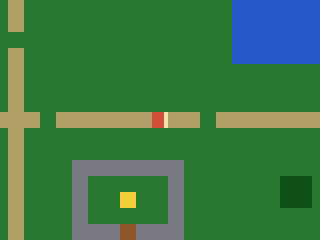
solid_at(pixel_x, pixel_y) maps a world pixel to a tile and checks a SOLID set; can_walk()
probes the hero’s four corners. We test the X and Y moves separately, so you slide
along a wall instead of sticking when pushing diagonally into it. (The engine also ships
picogame_tiles with ready-made tile probing if you’d rather not hand-roll it.)
You see: water, trees and walls now block you. Try it: add a tile value to SOLID (or remove one).
54 collapsed lines
# Quest -- step 3: walls (tile-based collision).## What you learn: stop the hero walking through water/trees/walls. Convert a world# pixel to a tile (tx = px // TILE), look the tile up, and treat some values as# SOLID. can_walk() probes the hero's body (its four corners, inset a little) so it# can't clip into a wall. We test the X and Y moves SEPARATELY, so the hero slides# along a wall instead of sticking when you push diagonally into it.## New vs step 2: solid_at()/can_walk() pixel->tile collision, per-axis movement.## Run: python3 sim/run.py tutorials/03-quest/step3_walls.py --hold RIGHT --shot /tmp/q3.png
import arrayimport picogame as pgimport picogame_gameimport picogame_inputimport picogame_clockimport picogame_shapes as shp
W, H = picogame_game.screen() # never hardcode: the same game runs at 240x240 and 640x480TILE = 16SPEED = 2MAP = [ "##############################", "#.....:......................#", "#.....:........*.............#", "#..##.:.............~~~~~~...#", "#..##.:.............~~~~~~...#", "#.....N.............~~~~~~...#", "#.....:.......E.....~~~~~~...#", "#.....:......................#", "#.....:.....*.........*......#", "#.....:......................#", "#:::::::P:::::::::*::::::::::#", "#.....:...................*..#", "#.....:.............E........#", "#.....:...WWWWWWW............#", "#.....:...W.....W......##....#", "#.....:.*.W..G..W......##....#", "#.....:...W.....W........E...#", "#.....:...WWWDWWW............#", "#.....:......................#", "##############################",]MAPCOLS, MAPROWS = 30, 20# tile values (frame index into the colour tileset; 0 = empty)GRASS, PATH, WATER, TREE, WALL, DOOR, GOAL = 1, 2, 3, 4, 5, 6, 7CHAR2TILE = {".": GRASS, "P": GRASS, "N": GRASS, "*": GRASS, "E": GRASS, ":": PATH, "~": WATER, "#": TREE, "W": WALL, "D": DOOR, "G": GOAL}TILE_RGB = [(40, 120, 50), # GRASS (180, 160, 110), # PATH (40, 90, 200), # WATER (20, 80, 30), # TREE (120, 120, 130), # WALL (150, 90, 40), # DOOR (240, 210, 60)] # GOALSOLID = (WATER, TREE, WALL, DOOR) # these tiles block movementDOWN, UP, LEFT, RIGHT = 0, 1, 2, 3 # facing -> frame index
scene, _, _ = picogame_game.setup(background=pg.rgb565(0, 0, 0))37 collapsed lines
btn = picogame_input.Buttons()clock = picogame_clock.Clock(30)
tileset = shp.tileset_colors(TILE, TILE, [pg.rgb565(*color) for color in TILE_RGB])world = pg.Tilemap(tileset, MAPCOLS, MAPROWS)hero_x, hero_y = TILE, TILEfor tile_y in range(MAPROWS): for tile_x in range(MAPCOLS): char = MAP[tile_y][tile_x] if tile_x < len(MAP[tile_y]) else "." world.set_tile(tile_x, tile_y, CHAR2TILE.get(char, GRASS)) if char == "P": hero_x, hero_y = tile_x * TILE, tile_y * TILEscene.add(world)
# a PLACEHOLDER hero: a plain red square with a brighter bar on the facing edge, so you# can see which way it points. 4 frames = 4 directions (frame = facing). Step 4 replaces# it with a real drawn character.RED = pg.rgb565(210, 80, 60)EDGE = pg.rgb565(255, 225, 170)
def hero_bitmap(): palette = array.array("H", [pg.rgb565(0, 0, 0), RED, EDGE]) # index 0 = transparent stride = TILE * 4 # 4 frames side by side, 1 byte/px data = bytearray(stride * TILE) for facing in range(4): # 0 down, 1 up, 2 left, 3 right for y in range(TILE): for x in range(TILE): on_facing_edge = ((facing == 0 and y >= TILE - 3) or (facing == 1 and y < 3) or (facing == 2 and x < 3) or (facing == 3 and x >= TILE - 3)) data[y * stride + facing * TILE + x] = 2 if on_facing_edge else 1 return pg.Bitmap(data, TILE, TILE, format=pg.PAL8, palette=palette, frames=4, stride=stride)
hero = pg.Sprite(hero_bitmap(), hero_x, hero_y, frame=DOWN)scene.add(hero)
def solid_at(pixel_x, pixel_y): tile_x, tile_y = pixel_x // TILE, pixel_y // TILE if tile_x < 0 or tile_x >= MAPCOLS or tile_y < 0 or tile_y >= MAPROWS: return True return world.get_tile(tile_x, tile_y) in SOLID
def can_walk(pixel_x, pixel_y): # probe the hero's body corners (inset 2px) -- all must be free return not (solid_at(pixel_x + 2, pixel_y + 2) or solid_at(pixel_x + TILE - 3, pixel_y + 2) or solid_at(pixel_x + 2, pixel_y + TILE - 3) or solid_at(pixel_x + TILE - 3, pixel_y + TILE - 3))
def camera_follow(): offset_x = max(W - MAPCOLS * TILE, min(0, W // 2 - (hero.x + TILE // 2)))8 collapsed lines
offset_y = max(H - MAPROWS * TILE, min(0, H // 2 - (hero.y + TILE // 2))) scene.set_view(int(offset_x), int(offset_y))
camera_follow()while True: btn.poll() delta_x = btn.is_pressed(btn.RIGHT) - btn.is_pressed(btn.LEFT) delta_y = btn.is_pressed(btn.DOWN) - btn.is_pressed(btn.UP) if delta_x: hero.frame = RIGHT if delta_x > 0 else LEFT elif delta_y: hero.frame = DOWN if delta_y > 0 else UP
moved = False if delta_x and can_walk(hero.x + delta_x * SPEED, hero.y): # test X alone hero.move(hero.x + delta_x * SPEED, hero.y); moved = True if delta_y and can_walk(hero.x, hero.y + delta_y * SPEED): # then Y alone -> slide hero.move(hero.x, hero.y + delta_y * SPEED); moved = True if moved: camera_follow()
scene.refresh() clock.tick()step 4 — step4_anim.py · walk animation
Section titled “step 4 — step4_anim.py · walk animation”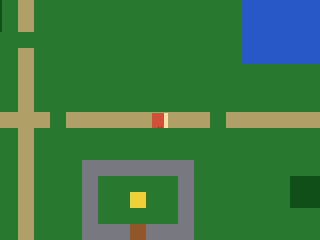 Now we replace the placeholder square with a character drawn from ASCII
masks (down/up/side, with LEFT the side view mirrored by
Now we replace the placeholder square with a character drawn from ASCII
masks (down/up/side, with LEFT the side view mirrored by flip_x), with two poses per facing,
driven by picogame_anim.AnimatedSprite: play(name) picks the facing’s animation,
tick(dt) advances it using the real dt from clock.tick() (so the walk speed is frame-rate
independent). You see: a walk cycle in your direction of travel, and the rest pose when you
stand still. Try it: change the animation fps.
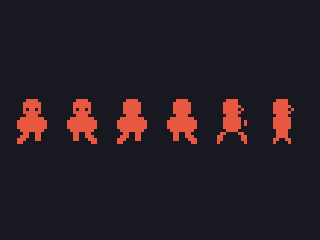
The frames here are hand-drawn ASCII masks, so you can focus on the animation code. For
custom artwork, draw an image sprite sheet and bake it to
a Bitmap with tools/png2picogame.py, then animate by frame index — the same AnimatedSprite
drives that too. See the assets guide and each tutorial’s bonus_art.py.
22 collapsed lines
# Quest -- step 4: a walking animation.## What you learn: time-based animation -- and giving the hero real art. We retire the# placeholder square and draw a proper character from ASCII masks (down / up / side, with# LEFT the side view mirrored by flip_x), with TWO poses per facing, then drive the walk# with picogame_anim.AnimatedSprite: play(name) picks the facing's animation, tick(dt)# advances it with the real dt from clock.tick() (so the walk speed is frame-rate# independent); standing still we show the still pose.## Here the frames are hand-drawn masks (no asset), so we animate by SWAPPING whole# bitmaps. A REAL game usually loads a proper image sprite-sheet (a PNG baked with# tools/png2picogame.py -> one multi-frame Bitmap) and animates by frame INDEX -- the# same AnimatedSprite drives that too. See the bonus_art step / the assets guide.## New vs step 3: the drawn masked hero (replacing the placeholder square) + sprite.flip_x# for LEFT, two walk poses per facing, picogame_anim.AnimatedSprite over a bitmap list,# play()/tick(dt), the dt from clock.tick().## Run: python3 sim/run.py tutorials/03-quest/step4_anim.py --hold RIGHT --shot /tmp/q4.png
import picogame as pgimport picogame_gameimport picogame_inputimport picogame_clockimport picogame_animimport picogame_shapes as shp
36 collapsed lines
W, H = picogame_game.screen() # never hardcode: the same game runs at 240x240 and 640x480TILE = 16SPEED = 2MAP = [ "##############################", "#.....:......................#", "#.....:........*.............#", "#..##.:.............~~~~~~...#", "#..##.:.............~~~~~~...#", "#.....N.............~~~~~~...#", "#.....:.......E.....~~~~~~...#", "#.....:......................#", "#.....:.....*.........*......#", "#.....:......................#", "#:::::::P:::::::::*::::::::::#", "#.....:...................*..#", "#.....:.............E........#", "#.....:...WWWWWWW............#", "#.....:...W.....W......##....#", "#.....:.*.W..G..W......##....#", "#.....:...W.....W........E...#", "#.....:...WWWDWWW............#", "#.....:......................#", "##############################",]MAPCOLS, MAPROWS = 30, 20# tile values (frame index into the colour tileset; 0 = empty)GRASS, PATH, WATER, TREE, WALL, DOOR, GOAL = 1, 2, 3, 4, 5, 6, 7CHAR2TILE = {".": GRASS, "P": GRASS, "N": GRASS, "*": GRASS, "E": GRASS, ":": PATH, "~": WATER, "#": TREE, "W": WALL, "D": DOOR, "G": GOAL}TILE_RGB = [(40, 120, 50), # GRASS (180, 160, 110), # PATH (40, 90, 200), # WATER (20, 80, 30), # TREE (120, 120, 130), # WALL (150, 90, 40), # DOOR (240, 210, 60)] # GOALSOLID = (WATER, TREE, WALL, DOOR) # these tiles block movementDOWN, UP, LEFT, RIGHT = 0, 1, 2, 3FACING_ANIM = ("down", "up", "side", "side") # animation per facing (left/right share the side art)WALK_FPS = 8
scene, _, _ = picogame_game.setup(background=pg.rgb565(0, 0, 0))13 collapsed lines
btn = picogame_input.Buttons()clock = picogame_clock.Clock(30)
tileset = shp.tileset_colors(TILE, TILE, [pg.rgb565(*color) for color in TILE_RGB])world = pg.Tilemap(tileset, MAPCOLS, MAPROWS)hero_x, hero_y = TILE, TILEfor tile_y in range(MAPROWS): for tile_x in range(MAPCOLS): char = MAP[tile_y][tile_x] if tile_x < len(MAP[tile_y]) else "." world.set_tile(tile_x, tile_y, CHAR2TILE.get(char, GRASS)) if char == "P": hero_x, hero_y = tile_x * TILE, tile_y * TILEscene.add(world)
# --- the hero: ASCII pixel art you can edit. '#' = a pixel, '.' = transparent. One# colour = a 1-bit silhouette; the FACING reads from the shape: DOWN has eyes, UP is# the back of the head, SIDE is a profile with a nose (LEFT = SIDE mirrored at runtime# with flip_x). Two poses per facing make the walk -- the legs scissor between A and B.HERO_COLOR = pg.rgb565(235, 90, 70)DOWN_A = [ "................", ".....####.......", "....######......", "....######......", "....#.##.#......", # eye gaps -> the face "....######......", ".....####.......", "...########.....", "..##########....", "..##########....", "..##########....", "...########.....", "....##..##......", "...###..##......", "..###...##......", # left foot forward "..##............",]DOWN_B = [ "................", ".....####.......", "....######......", "....######......", "....#.##.#......", "....######......", ".....####.......", "...########.....", "..##########....", "..##########....", "..##########....", "...########.....", "....##..##......", "....##..###.....", "....##...###....", # right foot forward "..........##....",]UP_A = [ "................", ".....####.......", "....######......", "....######......", "....######......", # solid head = the hero's back "....######......", ".....####.......", "...########.....", "..##########....", "..##########....", "..##########....", "...########.....", "....##..##......", "...###..##......", "..###...##......", "..##............",]UP_B = [ "................", ".....####.......", "....######......", "....######......", "....######......", "....######......", ".....####.......", "...########.....", "..##########....", "..##########....", "..##########....", "...########.....", "....##..##......", "....##..###.....", "....##...###....", "..........##....",]SIDE_A = [ "................", ".....####.......", "....#####.......", "....######......", "....#####.#.....", # nose nub -> faces right (flip_x -> left) "....######......", ".....####.......", "....######......", "....######.#....", # arm swung forward "....######.#....", "....######......", ".....####.......", "...##....##.....", # legs split "..##......##....", "..##......##....", "..#........#....",]SIDE_B = [ "................", ".....####.......", "....#####.......", "....######......", "....#####.#.....", "....######......", ".....####.......", "....######......", "....######......", # arm tucked in "....######......", "....######......", ".....####.......", ".....####.......", # legs pass under the body ".....####.......", "....##..##......", "....#....#......",]BM = {"down": [shp.from_mask(DOWN_A, HERO_COLOR), shp.from_mask(DOWN_B, HERO_COLOR)], "up": [shp.from_mask(UP_A, HERO_COLOR), shp.from_mask(UP_B, HERO_COLOR)], "side": [shp.from_mask(SIDE_A, HERO_COLOR), shp.from_mask(SIDE_B, HERO_COLOR)]}
hero = pg.Sprite(BM["down"][0], hero_x, hero_y)# each entry: name: (bitmap list, frames-per-second, loop?) -- AnimatedSprite accepts# a list of Bitmaps to swap in, not only frame indices into one sheetwalk = picogame_anim.AnimatedSprite(hero, { "down": (BM["down"], WALK_FPS, True), "up": (BM["up"], WALK_FPS, True), "side": (BM["side"], WALK_FPS, True)})scene.add(hero)
facing = DOWN
def solid_at(pixel_x, pixel_y): tile_x, tile_y = pixel_x // TILE, pixel_y // TILE15 collapsed lines
if tile_x < 0 or tile_x >= MAPCOLS or tile_y < 0 or tile_y >= MAPROWS: return True return world.get_tile(tile_x, tile_y) in SOLID
def can_walk(pixel_x, pixel_y): return not (solid_at(pixel_x + 2, pixel_y + 2) or solid_at(pixel_x + TILE - 3, pixel_y + 2) or solid_at(pixel_x + 2, pixel_y + TILE - 3) or solid_at(pixel_x + TILE - 3, pixel_y + TILE - 3))
def camera_follow(): offset_x = max(W - MAPCOLS * TILE, min(0, W // 2 - (hero.x + TILE // 2))) offset_y = max(H - MAPROWS * TILE, min(0, H // 2 - (hero.y + TILE // 2))) scene.set_view(int(offset_x), int(offset_y))
camera_follow()dt = 1 / 30 # assume one 30fps frame for the first tick; clock.tick() returns real dt after thatwhile True: btn.poll() # True/False count as 1/0, so this is -1 (left), 0, or +1 (right) delta_x = btn.is_pressed(btn.RIGHT) - btn.is_pressed(btn.LEFT) delta_y = btn.is_pressed(btn.DOWN) - btn.is_pressed(btn.UP) if delta_x: facing = RIGHT if delta_x > 0 else LEFT elif delta_y: facing = DOWN if delta_y > 0 else UP hero.flip_x = (facing == LEFT) # mirror the side art for LEFT
moved = False if delta_x and can_walk(hero.x + delta_x * SPEED, hero.y): hero.move(hero.x + delta_x * SPEED, hero.y); moved = True if delta_y and can_walk(hero.x, hero.y + delta_y * SPEED): hero.move(hero.x, hero.y + delta_y * SPEED); moved = True if moved: camera_follow() walk.play(FACING_ANIM[facing]) # animate the walk while moving walk.tick(dt) else: hero.bitmap = BM[FACING_ANIM[facing]][0] # still: pose A of the current facing
scene.refresh() dt = clock.tick()step 5 — step5_items.py · items + a fixed HUD
Section titled “step 5 — step5_items.py · items + a fixed HUD”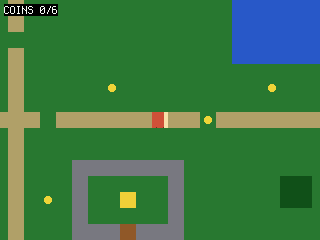 Coins are sprites placed from the map; being normal scene items, they scroll with the
world. We collect one when the hero is close, hide it, and count it.
Coins are sprites placed from the map; being normal scene items, they scroll with the
world. We collect one when the hero is close, hide it, and count it. picogame_ui.SceneLabel
is a fixed layer: it does NOT scroll, so the counter stays pinned to the corner.
You see: coins dotted through the world that you scoop up close, and a counter pinned in the corner that doesn’t scroll. Try it: add more * coins to the map.
12 collapsed lines
# Quest -- step 5: collectible items + a HUD over the scrolling world.## What you learn: world-space pickups and a camera-fixed HUD. Coins are sprites# placed at map positions; because they're normal scene items they scroll with the# world. We collect one when the hero is close enough (a simple distance test), hide# it, and bump a counter. picogame_ui.SceneLabel is a FIXED scene layer -- it does NOT# scroll, so the coin counter stays pinned to the corner while the world moves under# it.## New vs step 4: item sprites placed from the map, distance-based pickup, a fixed# SceneLabel counter.## Run: python3 sim/run.py tutorials/03-quest/step5_items.py --hold RIGHT --shot /tmp/q5.png
import terminalioimport picogame as pgimport picogame_gameimport picogame_inputimport picogame_clockimport picogame_animimport picogame_shapes as shpimport picogame_ui as ui
W, H = picogame_game.screen() # never hardcode: the same game runs at 240x240 and 640x48038 collapsed lines
TILE = 16SPEED = 2MAP = [ "##############################", "#.....:......................#", "#.....:........*.............#", "#..##.:.............~~~~~~...#", "#..##.:.............~~~~~~...#", "#.....N.............~~~~~~...#", "#.....:.......E.....~~~~~~...#", "#.....:......................#", "#.....:.....*.........*......#", "#.....:......................#", "#:::::::P:::::::::*::::::::::#", "#.....:...................*..#", "#.....:.............E........#", "#.....:...WWWWWWW............#", "#.....:...W.....W......##....#", "#.....:.*.W..G..W......##....#", "#.....:...W.....W........E...#", "#.....:...WWWDWWW............#", "#.....:......................#", "##############################",]MAPCOLS, MAPROWS = 30, 20# tile values (frame index into the colour tileset; 0 = empty)GRASS, PATH, WATER, TREE, WALL, DOOR, GOAL = 1, 2, 3, 4, 5, 6, 7CHAR2TILE = {".": GRASS, "P": GRASS, "N": GRASS, "*": GRASS, "E": GRASS, ":": PATH, "~": WATER, "#": TREE, "W": WALL, "D": DOOR, "G": GOAL}TILE_RGB = [(40, 120, 50), # GRASS (180, 160, 110), # PATH (40, 90, 200), # WATER (20, 80, 30), # TREE (120, 120, 130), # WALL (150, 90, 40), # DOOR (240, 210, 60)] # GOALSOLID = (WATER, TREE, WALL, DOOR) # these tiles block movementDOWN, UP, LEFT, RIGHT = 0, 1, 2, 3FACING_ANIM = ("down", "up", "side", "side") # animation per facing (left/right share the side art)WALK_FPS = 8BACKGROUND = pg.rgb565(0, 0, 0)
scene, _, _ = picogame_game.setup(background=BACKGROUND)btn = picogame_input.Buttons()clock = picogame_clock.Clock(30)
tileset = shp.tileset_colors(TILE, TILE, [pg.rgb565(*color) for color in TILE_RGB])world = pg.Tilemap(tileset, MAPCOLS, MAPROWS)hero_x, hero_y = TILE, TILEcoin_spots = []for tile_y in range(MAPROWS): for tile_x in range(MAPCOLS): char = MAP[tile_y][tile_x] if tile_x < len(MAP[tile_y]) else "." world.set_tile(tile_x, tile_y, CHAR2TILE.get(char, GRASS)) if char == "P": hero_x, hero_y = tile_x * TILE, tile_y * TILE elif char == "*": coin_spots.append((tile_x * TILE, tile_y * TILE))scene.add(world)
coin_bitmap = shp.circle(8, pg.rgb565(245, 215, 60))coins = [pg.Sprite(coin_bitmap, x + 4, y + 4) for (x, y) in coin_spots] # +4 to centre in tilefor coin in coins: scene.add(coin)
# --- the hero: ASCII pixel art you can edit. '#' = a pixel, '.' = transparent. One# colour = a 1-bit silhouette; the FACING reads from the shape: DOWN has eyes, UP is118 collapsed lines
# the back of the head, SIDE is a profile with a nose (LEFT = SIDE mirrored at runtime# with flip_x). Two poses per facing make the walk -- the legs scissor between A and B.HERO_COLOR = pg.rgb565(235, 90, 70)DOWN_A = [ "................", ".....####.......", "....######......", "....######......", "....#.##.#......", # eye gaps -> the face "....######......", ".....####.......", "...########.....", "..##########....", "..##########....", "..##########....", "...########.....", "....##..##......", "...###..##......", "..###...##......", # left foot forward "..##............",]DOWN_B = [ "................", ".....####.......", "....######......", "....######......", "....#.##.#......", "....######......", ".....####.......", "...########.....", "..##########....", "..##########....", "..##########....", "...########.....", "....##..##......", "....##..###.....", "....##...###....", # right foot forward "..........##....",]UP_A = [ "................", ".....####.......", "....######......", "....######......", "....######......", # solid head = the hero's back "....######......", ".....####.......", "...########.....", "..##########....", "..##########....", "..##########....", "...########.....", "....##..##......", "...###..##......", "..###...##......", "..##............",]UP_B = [ "................", ".....####.......", "....######......", "....######......", "....######......", "....######......", ".....####.......", "...########.....", "..##########....", "..##########....", "..##########....", "...########.....", "....##..##......", "....##..###.....", "....##...###....", "..........##....",]SIDE_A = [ "................", ".....####.......", "....#####.......", "....######......", "....#####.#.....", # nose nub -> faces right (flip_x -> left) "....######......", ".....####.......", "....######......", "....######.#....", # arm swung forward "....######.#....", "....######......", ".....####.......", "...##....##.....", # legs split "..##......##....", "..##......##....", "..#........#....",]SIDE_B = [ "................", ".....####.......", "....#####.......", "....######......", "....#####.#.....", "....######......", ".....####.......", "....######......", "....######......", # arm tucked in "....######......", "....######......", ".....####.......", ".....####.......", # legs pass under the body ".....####.......", "....##..##......", "....#....#......",]BM = {"down": [shp.from_mask(DOWN_A, HERO_COLOR), shp.from_mask(DOWN_B, HERO_COLOR)], "up": [shp.from_mask(UP_A, HERO_COLOR), shp.from_mask(UP_B, HERO_COLOR)], "side": [shp.from_mask(SIDE_A, HERO_COLOR), shp.from_mask(SIDE_B, HERO_COLOR)]}hero = pg.Sprite(BM["down"][0], hero_x, hero_y)walk = picogame_anim.AnimatedSprite(hero, { "down": (BM["down"], WALK_FPS, True), "up": (BM["up"], WALK_FPS, True), "side": (BM["side"], WALK_FPS, True)})scene.add(hero)hud = ui.SceneLabel(scene, pg, terminalio.FONT, 4, 4, pg.rgb565(255, 255, 255), BACKGROUND)
facing = DOWNcoins_collected = 0
17 collapsed lines
def solid_at(pixel_x, pixel_y): tile_x, tile_y = pixel_x // TILE, pixel_y // TILE if tile_x < 0 or tile_x >= MAPCOLS or tile_y < 0 or tile_y >= MAPROWS: return True return world.get_tile(tile_x, tile_y) in SOLID
def can_walk(pixel_x, pixel_y): return not (solid_at(pixel_x + 2, pixel_y + 2) or solid_at(pixel_x + TILE - 3, pixel_y + 2) or solid_at(pixel_x + 2, pixel_y + TILE - 3) or solid_at(pixel_x + TILE - 3, pixel_y + TILE - 3))
def camera_follow(): offset_x = max(W - MAPCOLS * TILE, min(0, W // 2 - (hero.x + TILE // 2))) offset_y = max(H - MAPROWS * TILE, min(0, H // 2 - (hero.y + TILE // 2))) scene.set_view(int(offset_x), int(offset_y))
camera_follow()dt = 1 / 30while True: btn.poll()14 collapsed lines
# True/False count as 1/0, so this is -1 (left), 0, or +1 (right) delta_x = btn.is_pressed(btn.RIGHT) - btn.is_pressed(btn.LEFT) delta_y = btn.is_pressed(btn.DOWN) - btn.is_pressed(btn.UP) if delta_x: facing = RIGHT if delta_x > 0 else LEFT elif delta_y: facing = DOWN if delta_y > 0 else UP hero.flip_x = (facing == LEFT) # mirror the side art for LEFT
moved = False if delta_x and can_walk(hero.x + delta_x * SPEED, hero.y): hero.move(hero.x + delta_x * SPEED, hero.y); moved = True if delta_y and can_walk(hero.x, hero.y + delta_y * SPEED): hero.move(hero.x, hero.y + delta_y * SPEED); moved = True if moved: camera_follow() walk.play(FACING_ANIM[facing]); walk.tick(dt) else: hero.bitmap = BM[FACING_ANIM[facing]][0] # still: pose A of the current facing
# pick up any coin we're standing on (within ~12px on both axes = close enough) for coin in coins: if coin.visible and abs(hero.x - coin.x) < 12 and abs(hero.y - coin.y) < 12: coin.visible = False coins_collected += 1
hud.set("COINS %d/%d" % (coins_collected, len(coins))) scene.refresh() dt = clock.tick()step 6 — step6_npc.py · talk to an NPC
Section titled “step 6 — step6_npc.py · talk to an NPC”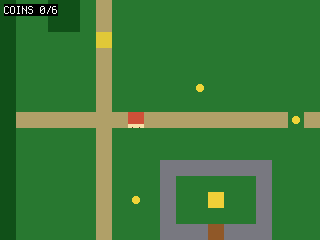 Stand next to the NPC and press A to switch into a dialog mode: the world keeps drawing
underneath while
Stand next to the NPC and press A to switch into a dialog mode: the world keeps drawing
underneath while picogame_ui.TextBox overlays a message; movement is frozen until you
press a button. You see: a “PRESS A” prompt near the NPC, then a dialog box. Try it:
change the dialog LINES.
A tidy-up: the State object. The mutable variables are piling up, and as globals each needs a
global line in every function that changes it. So we group them into one class State (st.coins,
st.mode); objects that never change reference (the hero, the tilemap) stay module-level.
23 collapsed lines
# Quest -- step 6: an NPC you can talk to (and a State object + a main() loop to tidy up).## What you learn: interaction + a simple state machine for dialog, AND how to keep# the growing pile of game variables under control. An NPC is a sprite; when the hero# stands next to it and presses A we switch to a DIALOG mode: the world keeps drawing# underneath, and picogame_ui.TextBox draws a multi-line message box on top (a# screen-space overlay, drawn after scene.refresh). While in dialog we DON'T process# movement -- the game is paused on the box until you press a button to dismiss it.## State object: the loose module variables have been piling up (facing, coins, a# mode, a "dialog shown" flag...) and the next steps add HP, a cooldown, a quest# stage. Instead of a scatter of globals (and a `global` in every function that# touches them), we group them in ONE `class State` and make `st = State()`. Now it's# `st.coins`, `st.mode`, with no `global` needed. Objects that never get REASSIGNED# (the hero Sprite, the world Tilemap, the labels) stay plain module-level names;# State holds only the mutable scalars. The game mode is a named INT constant# (EXPLORE / DIALOG) rather than a magic string, so a branch reads `st.mode ==# DIALOG`.## New vs step 5: an NPC sprite, a State object, the loop moved into a main() function,# a mode machine (EXPLORE/DIALOG), picogame_ui.TextBox, freezing the world during# dialog, an adjacency "PRESS A" prompt.## Run: python3 sim/run.py tutorials/03-quest/step6_npc.py --shot /tmp/q6.png
import boardimport terminalioimport picogame as pg44 collapsed lines
import picogame_gameimport picogame_inputimport picogame_clockimport picogame_animimport picogame_shapes as shpimport picogame_ui as ui
W, H = picogame_game.screen() # never hardcode: the same game runs at 240x240 and 640x480TILE = 16SPEED = 2MAP = [ "##############################", "#.....:......................#", "#.....:........*.............#", "#..##.:.............~~~~~~...#", "#..##.:.............~~~~~~...#", "#.....N.............~~~~~~...#", "#.....:.......E.....~~~~~~...#", "#.....:......................#", "#.....:.....*.........*......#", "#.....:......................#", "#:::::::P:::::::::*::::::::::#", "#.....:...................*..#", "#.....:.............E........#", "#.....:...WWWWWWW............#", "#.....:...W.....W......##....#", "#.....:.*.W..G..W......##....#", "#.....:...W.....W........E...#", "#.....:...WWWDWWW............#", "#.....:......................#", "##############################",]MAPCOLS, MAPROWS = 30, 20# tile values (frame index into the colour tileset; 0 = empty)GRASS, PATH, WATER, TREE, WALL, DOOR, GOAL = 1, 2, 3, 4, 5, 6, 7CHAR2TILE = {".": GRASS, "P": GRASS, "N": GRASS, "*": GRASS, "E": GRASS, ":": PATH, "~": WATER, "#": TREE, "W": WALL, "D": DOOR, "G": GOAL}TILE_RGB = [(40, 120, 50), # GRASS (180, 160, 110), # PATH (40, 90, 200), # WATER (20, 80, 30), # TREE (120, 120, 130), # WALL (150, 90, 40), # DOOR (240, 210, 60)] # GOALSOLID = (WATER, TREE, WALL, DOOR) # these tiles block movementDOWN, UP, LEFT, RIGHT = 0, 1, 2, 3FACING_ANIM = ("down", "up", "side", "side") # animation per facing (left/right share the side art)EXPLORE, DIALOG = 0, 1 # game modes (int constants, not strings)WALK_FPS = 8 # walk-animation speed (frames per second)BACKGROUND = pg.rgb565(0, 0, 0)WHITE = pg.rgb565(255, 255, 255)NAVY = pg.rgb565(10, 10, 40)
# buffer_a/buffer_b = the engine's two shared render strips; immediate-mode draws# (the dialog box below) paint straight into buffer_ascene, buffer_a, buffer_b = picogame_game.setup(background=BACKGROUND)btn = picogame_input.Buttons()clock = picogame_clock.Clock(30)
tileset = shp.tileset_colors(TILE, TILE, [pg.rgb565(*color) for color in TILE_RGB])world = pg.Tilemap(tileset, MAPCOLS, MAPROWS)hero_x, hero_y = TILE, TILEnpc_x, npc_y = TILE, TILEcoin_spots = []for tile_y in range(MAPROWS): for tile_x in range(MAPCOLS): char = MAP[tile_y][tile_x] if tile_x < len(MAP[tile_y]) else "." world.set_tile(tile_x, tile_y, CHAR2TILE.get(char, GRASS)) if char == "P": hero_x, hero_y = tile_x * TILE, tile_y * TILE elif char == "N": npc_x, npc_y = tile_x * TILE, tile_y * TILE elif char == "*": coin_spots.append((tile_x * TILE, tile_y * TILE))scene.add(world)
coin_bitmap = shp.circle(8, pg.rgb565(245, 215, 60))coins = [pg.Sprite(coin_bitmap, x + 4, y + 4) for (x, y) in coin_spots]for coin in coins: scene.add(coin)npc = pg.Sprite(shp.rect(TILE, TILE, pg.rgb565(230, 200, 60)), npc_x, npc_y)scene.add(npc)
120 collapsed lines
# --- the hero: ASCII pixel art you can edit. '#' = a pixel, '.' = transparent. One# colour = a 1-bit silhouette; the FACING reads from the shape: DOWN has eyes, UP is# the back of the head, SIDE is a profile with a nose (LEFT = SIDE mirrored at runtime# with flip_x). Two poses per facing make the walk -- the legs scissor between A and B.HERO_COLOR = pg.rgb565(235, 90, 70)DOWN_A = [ "................", ".....####.......", "....######......", "....######......", "....#.##.#......", # eye gaps -> the face "....######......", ".....####.......", "...########.....", "..##########....", "..##########....", "..##########....", "...########.....", "....##..##......", "...###..##......", "..###...##......", # left foot forward "..##............",]DOWN_B = [ "................", ".....####.......", "....######......", "....######......", "....#.##.#......", "....######......", ".....####.......", "...########.....", "..##########....", "..##########....", "..##########....", "...########.....", "....##..##......", "....##..###.....", "....##...###....", # right foot forward "..........##....",]UP_A = [ "................", ".....####.......", "....######......", "....######......", "....######......", # solid head = the hero's back "....######......", ".....####.......", "...########.....", "..##########....", "..##########....", "..##########....", "...########.....", "....##..##......", "...###..##......", "..###...##......", "..##............",]UP_B = [ "................", ".....####.......", "....######......", "....######......", "....######......", "....######......", ".....####.......", "...########.....", "..##########....", "..##########....", "..##########....", "...########.....", "....##..##......", "....##..###.....", "....##...###....", "..........##....",]SIDE_A = [ "................", ".....####.......", "....#####.......", "....######......", "....#####.#.....", # nose nub -> faces right (flip_x -> left) "....######......", ".....####.......", "....######......", "....######.#....", # arm swung forward "....######.#....", "....######......", ".....####.......", "...##....##.....", # legs split "..##......##....", "..##......##....", "..#........#....",]SIDE_B = [ "................", ".....####.......", "....#####.......", "....######......", "....#####.#.....", "....######......", ".....####.......", "....######......", "....######......", # arm tucked in "....######......", "....######......", ".....####.......", ".....####.......", # legs pass under the body ".....####.......", "....##..##......", "....#....#......",]BM = {"down": [shp.from_mask(DOWN_A, HERO_COLOR), shp.from_mask(DOWN_B, HERO_COLOR)], "up": [shp.from_mask(UP_A, HERO_COLOR), shp.from_mask(UP_B, HERO_COLOR)], "side": [shp.from_mask(SIDE_A, HERO_COLOR), shp.from_mask(SIDE_B, HERO_COLOR)]}hero = pg.Sprite(BM["down"][0], hero_x, hero_y)walk = picogame_anim.AnimatedSprite(hero, { "down": (BM["down"], WALK_FPS, True), "up": (BM["up"], WALK_FPS, True), "side": (BM["side"], WALK_FPS, True)})scene.add(hero)hud = ui.SceneLabel(scene, pg, terminalio.FONT, 4, 4, WHITE, BACKGROUND)dialog = ui.TextBox(pg, terminalio.FONT, 8, H - 64, W - 16, 58, WHITE, NAVY, maxlines=4)LINES = ["Villager:", "Beware the slimes in the", "tall grass, traveller.", "(press A)"]
class State: """All the mutable game variables in one place (was a pile of module globals). __init__ just calls reset(), so every default lives in ONE spot and a restart would be a single call -- st.reset().""" def __init__(self): self.reset()
def reset(self): self.facing = DOWN self.coins = 0 self.mode = EXPLORE # EXPLORE = walking around, DIALOG = talking self.dlg_shown = False # draw the modal once, not every frame
st = State()
def solid_at(pixel_x, pixel_y): tile_x, tile_y = pixel_x // TILE, pixel_y // TILE8 collapsed lines
if tile_x < 0 or tile_x >= MAPCOLS or tile_y < 0 or tile_y >= MAPROWS: return True return world.get_tile(tile_x, tile_y) in SOLID
def can_walk(pixel_x, pixel_y): return not (solid_at(pixel_x + 2, pixel_y + 2) or solid_at(pixel_x + TILE - 3, pixel_y + 2) or solid_at(pixel_x + 2, pixel_y + TILE - 3) or solid_at(pixel_x + TILE - 3, pixel_y + TILE - 3))
def near_npc(): # Adjacency is enough HERE: one interactable and A has no other role nearby. A game where # A also attacks gates this on facing too (st.facing points at the NPC) - genre rule. return abs(hero.x - npc.x) <= TILE and abs(hero.y - npc.y) <= TILE
def camera_follow(): offset_x = max(W - MAPCOLS * TILE, min(0, W // 2 - (hero.x + TILE // 2))) offset_y = max(H - MAPROWS * TILE, min(0, H // 2 - (hero.y + TILE // 2))) scene.set_view(int(offset_x), int(offset_y))
camera_follow()# The per-frame loop now lives in a FUNCTION (main), not at module scope. Inside a# function its names -- st, the loop's own delta_x/dt, the helpers -- resolve as fast# array-indexed locals instead of globals-dict lookups; on the device that's a# measured speed-up for the hot loop. It pairs naturally with the State tidy-up: one# st object + one main() is the shape every bigger game grows into.def main(): dt = 1 / 30 # seed the first frame; re-set from clock.tick() each loop while True: btn.poll()
if st.mode == DIALOG: if not st.dlg_shown: # draw ONCE -> no per-frame flicker scene.refresh() # world frozen under the box dialog.draw(scene.display, buffer_a, LINES) st.dlg_shown = True if btn.just_pressed(btn.A) or btn.just_pressed(btn.B): st.mode = EXPLORE scene.invalidate() # repaint over the box next frame clock.tick() continue
delta_x = btn.is_pressed(btn.RIGHT) - btn.is_pressed(btn.LEFT) delta_y = btn.is_pressed(btn.DOWN) - btn.is_pressed(btn.UP) if delta_x: st.facing = RIGHT if delta_x > 0 else LEFT elif delta_y: st.facing = DOWN if delta_y > 0 else UP hero.flip_x = (st.facing == LEFT) # mirror the side art for LEFT
moved = False if delta_x and can_walk(hero.x + delta_x * SPEED, hero.y): hero.move(hero.x + delta_x * SPEED, hero.y); moved = True if delta_y and can_walk(hero.x, hero.y + delta_y * SPEED): hero.move(hero.x, hero.y + delta_y * SPEED); moved = True if moved: camera_follow() walk.play(FACING_ANIM[st.facing]) # animate the walk while moving walk.tick(dt) else: hero.bitmap = BM[FACING_ANIM[st.facing]][0] # still: pose A of the current facing
# pick up any coin we're standing on (within ~12px on both axes = close enough) for coin in coins: if coin.visible and abs(hero.x - coin.x) < 12 and abs(hero.y - coin.y) < 12: coin.visible = False st.coins += 1
if near_npc(): hud.set("COINS %d/%d A: TALK" % (st.coins, len(coins))) if btn.just_pressed(btn.A): st.mode = DIALOG st.dlg_shown = False else: hud.set("COINS %d/%d" % (st.coins, len(coins)))
scene.refresh() dt = clock.tick()
main()step 7 — step7_combat.py · enemies + bump combat
Section titled “step 7 — step7_combat.py · enemies + bump combat”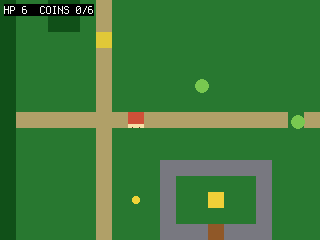 Slimes chase the hero (slower than you, respecting walls). Touching one costs HP and
briefly can’t be hurt again (a short cooldown); press B to swing at the tile you’re facing and defeat a
slime. HP shows in the HUD; reaching 0 sends you back to start. You see: slimes converging on you, HP ticking down in the HUD on each hit, and a B swing that clears the tile you face. (A still talks.) Try it:
change the slime speed or your starting HP.
Slimes chase the hero (slower than you, respecting walls). Touching one costs HP and
briefly can’t be hurt again (a short cooldown); press B to swing at the tile you’re facing and defeat a
slime. HP shows in the HUD; reaching 0 sends you back to start. You see: slimes converging on you, HP ticking down in the HUD on each hit, and a B swing that clears the tile you face. (A still talks.) Try it:
change the slime speed or your starting HP.
64 collapsed lines
# Quest -- step 7: enemies and bump combat.## What you learn: simple chasing AI, taking damage, and attacking. Slimes step# toward the hero (slower than you, and they respect walls via can_walk). Touching# one costs HP and starts a brief "can't be hurt again" cooldown (hurt_cooldown) so one touch doesn't# drain you instantly. Press B to swing: we defeat any slime in the tile just ahead# of the way you're facing. HP shows in the HUD; reaching 0 sends you back to start.## The State object from step 6 keeps paying off: HP, the hurt cooldown and a frame# counter just become more `st.` fields -- no new globals, no `global` soup.## New vs step 6: enemy sprites with chase AI, player HP + a brief hurt cooldown + knock-back,# a white hit-flash (sprite.flash) on damage, a B attack in the facing direction. (A still# talks to the NPC.)## Run: python3 sim/run.py tutorials/03-quest/step7_combat.py --hold B --shot /tmp/q7.png
import boardimport terminalioimport picogame as pgimport picogame_gameimport picogame_inputimport picogame_clockimport picogame_animimport picogame_shapes as shpimport picogame_ui as ui
W, H = picogame_game.screen() # never hardcode: the same game runs at 240x240 and 640x480TILE = 16SPEED = 2MAP = [ "##############################", "#.....:......................#", "#.....:........*.............#", "#..##.:.............~~~~~~...#", "#..##.:.............~~~~~~...#", "#.....N.............~~~~~~...#", "#.....:.......E.....~~~~~~...#", "#.....:......................#", "#.....:.....*.........*......#", "#.....:......................#", "#:::::::P:::::::::*::::::::::#", "#.....:...................*..#", "#.....:.............E........#", "#.....:...WWWWWWW............#", "#.....:...W.....W......##....#", "#.....:.*.W..G..W......##....#", "#.....:...W.....W........E...#", "#.....:...WWWDWWW............#", "#.....:......................#", "##############################",]MAPCOLS, MAPROWS = 30, 20# tile values (frame index into the colour tileset; 0 = empty)GRASS, PATH, WATER, TREE, WALL, DOOR, GOAL = 1, 2, 3, 4, 5, 6, 7CHAR2TILE = {".": GRASS, "P": GRASS, "N": GRASS, "*": GRASS, "E": GRASS, ":": PATH, "~": WATER, "#": TREE, "W": WALL, "D": DOOR, "G": GOAL}TILE_RGB = [(40, 120, 50), # GRASS (180, 160, 110), # PATH (40, 90, 200), # WATER (20, 80, 30), # TREE (120, 120, 130), # WALL (150, 90, 40), # DOOR (240, 210, 60)] # GOALSOLID = (WATER, TREE, WALL, DOOR) # these tiles block movementDOWN, UP, LEFT, RIGHT = 0, 1, 2, 3DIR = {DOWN: (0, 1), UP: (0, -1), LEFT: (-1, 0), RIGHT: (1, 0)} # facing -> (dx, dy) stepFACING_ANIM = ("down", "up", "side", "side") # animation per facing (left/right share the side art)EXPLORE, DIALOG = 0, 1 # game modes (int constants, not strings)WALK_FPS = 8 # walk-animation speed (frames per second)MAX_HP = 6HURT_FRAMES = 40 # ~1.3s of mercy after a hit (at 30 fps)FLASH_FRAMES = 3 # how long the white hit-flash showsBACKGROUND = pg.rgb565(0, 0, 0)WHITE = pg.rgb565(255, 255, 255)8 collapsed lines
NAVY = pg.rgb565(10, 10, 40)
# buffer_a/buffer_b = the engine's two shared render strips; immediate-mode draws# (the dialog box below) paint straight into buffer_ascene, buffer_a, buffer_b = picogame_game.setup(background=BACKGROUND)btn = picogame_input.Buttons()clock = picogame_clock.Clock(30)
tileset = shp.tileset_colors(TILE, TILE, [pg.rgb565(*color) for color in TILE_RGB])world = pg.Tilemap(tileset, MAPCOLS, MAPROWS)START = (TILE, TILE)npc_x, npc_y = TILE, TILEcoin_spots, enemy_spots = [], []for tile_y in range(MAPROWS): for tile_x in range(MAPCOLS): char = MAP[tile_y][tile_x] if tile_x < len(MAP[tile_y]) else "." world.set_tile(tile_x, tile_y, CHAR2TILE.get(char, GRASS)) if char == "P": START = (tile_x * TILE, tile_y * TILE) elif char == "N": npc_x, npc_y = tile_x * TILE, tile_y * TILE elif char == "*": coin_spots.append((tile_x * TILE, tile_y * TILE)) elif char == "E": enemy_spots.append((tile_x * TILE, tile_y * TILE))scene.add(world)
coin_bitmap = shp.circle(8, pg.rgb565(245, 215, 60))coins = [pg.Sprite(coin_bitmap, x + 4, y + 4) for (x, y) in coin_spots]for coin in coins: scene.add(coin)slime_bitmap = shp.circle(14, pg.rgb565(120, 200, 80))enemies = [pg.Sprite(slime_bitmap, x + 1, y + 1) for (x, y) in enemy_spots]for enemy in enemies: scene.add(enemy)npc = pg.Sprite(shp.rect(TILE, TILE, pg.rgb565(230, 200, 60)), npc_x, npc_y)scene.add(npc)116 collapsed lines
# --- the hero: ASCII pixel art you can edit. '#' = a pixel, '.' = transparent. One# colour = a 1-bit silhouette; the FACING reads from the shape: DOWN has eyes, UP is# the back of the head, SIDE is a profile with a nose (LEFT = SIDE mirrored at runtime# with flip_x). Two poses per facing make the walk -- the legs scissor between A and B.HERO_COLOR = pg.rgb565(235, 90, 70)DOWN_A = [ "................", ".....####.......", "....######......", "....######......", "....#.##.#......", # eye gaps -> the face "....######......", ".....####.......", "...########.....", "..##########....", "..##########....", "..##########....", "...########.....", "....##..##......", "...###..##......", "..###...##......", # left foot forward "..##............",]DOWN_B = [ "................", ".....####.......", "....######......", "....######......", "....#.##.#......", "....######......", ".....####.......", "...########.....", "..##########....", "..##########....", "..##########....", "...########.....", "....##..##......", "....##..###.....", "....##...###....", # right foot forward "..........##....",]UP_A = [ "................", ".....####.......", "....######......", "....######......", "....######......", # solid head = the hero's back "....######......", ".....####.......", "...########.....", "..##########....", "..##########....", "..##########....", "...########.....", "....##..##......", "...###..##......", "..###...##......", "..##............",]UP_B = [ "................", ".....####.......", "....######......", "....######......", "....######......", "....######......", ".....####.......", "...########.....", "..##########....", "..##########....", "..##########....", "...########.....", "....##..##......", "....##..###.....", "....##...###....", "..........##....",]SIDE_A = [ "................", ".....####.......", "....#####.......", "....######......", "....#####.#.....", # nose nub -> faces right (flip_x -> left) "....######......", ".....####.......", "....######......", "....######.#....", # arm swung forward "....######.#....", "....######......", ".....####.......", "...##....##.....", # legs split "..##......##....", "..##......##....", "..#........#....",]SIDE_B = [ "................", ".....####.......", "....#####.......", "....######......", "....#####.#.....", "....######......", ".....####.......", "....######......", "....######......", # arm tucked in "....######......", "....######......", ".....####.......", ".....####.......", # legs pass under the body ".....####.......", "....##..##......", "....#....#......",]BM = {"down": [shp.from_mask(DOWN_A, HERO_COLOR), shp.from_mask(DOWN_B, HERO_COLOR)], "up": [shp.from_mask(UP_A, HERO_COLOR), shp.from_mask(UP_B, HERO_COLOR)], "side": [shp.from_mask(SIDE_A, HERO_COLOR), shp.from_mask(SIDE_B, HERO_COLOR)]}hero = pg.Sprite(BM["down"][0], START[0], START[1])walk = picogame_anim.AnimatedSprite(hero, { "down": (BM["down"], WALK_FPS, True), "up": (BM["up"], WALK_FPS, True), "side": (BM["side"], WALK_FPS, True)})scene.add(hero)hud = ui.SceneLabel(scene, pg, terminalio.FONT, 4, 4, WHITE, BACKGROUND)dialog = ui.TextBox(pg, terminalio.FONT, 8, H - 64, W - 16, 58, WHITE, NAVY, maxlines=4)LINES = ["Villager:", "Slimes ahead! Press B to", "swing at them.", "(press A)"]
class State: """All the mutable game variables in one place (grows as the game does). __init__ calls reset().""" def __init__(self): self.reset()
def reset(self): self.facing = DOWN self.coins = 0 self.hp = MAX_HP self.hurt_cooldown = 0 # frames of mercy after a hit (i-frames) self.mode = EXPLORE # EXPLORE = walking around, DIALOG = talking self.frame_count = 0 # frames elapsed (slimes chase every other frame) self.dlg_shown = False # draw the modal once, not every frame
13 collapsed lines
st = State()
def solid_at(pixel_x, pixel_y): tile_x, tile_y = pixel_x // TILE, pixel_y // TILE if tile_x < 0 or tile_x >= MAPCOLS or tile_y < 0 or tile_y >= MAPROWS: return True return world.get_tile(tile_x, tile_y) in SOLID
def can_walk(pixel_x, pixel_y): return not (solid_at(pixel_x + 2, pixel_y + 2) or solid_at(pixel_x + TILE - 3, pixel_y + 2) or solid_at(pixel_x + 2, pixel_y + TILE - 3) or solid_at(pixel_x + TILE - 3, pixel_y + TILE - 3))
def near(a, bx, by, d=TILE): # True if sprite a is within d px of the point (bx, by) on both axes (a box test) return abs(a.x - bx) < d and abs(a.y - by) < d
5 collapsed lines
def camera_follow(): offset_x = max(W - MAPCOLS * TILE, min(0, W // 2 - (hero.x + TILE // 2))) offset_y = max(H - MAPROWS * TILE, min(0, H // 2 - (hero.y + TILE // 2))) scene.set_view(int(offset_x), int(offset_y))
camera_follow()def main(): # loop in a function -> its names are fast locals (see step 6) dt = 1 / 30 # seed the first frame; re-set from clock.tick() each loop while True: btn.poll() st.frame_count += 1
if st.mode == DIALOG: if not st.dlg_shown: # draw ONCE -> no per-frame flicker scene.refresh() dialog.draw(scene.display, buffer_a, LINES) st.dlg_shown = True if btn.just_pressed(btn.A) or btn.just_pressed(btn.B): st.mode = EXPLORE scene.invalidate() clock.tick() continue13 collapsed lines
delta_x = btn.is_pressed(btn.RIGHT) - btn.is_pressed(btn.LEFT) delta_y = btn.is_pressed(btn.DOWN) - btn.is_pressed(btn.UP) if delta_x: st.facing = RIGHT if delta_x > 0 else LEFT elif delta_y: st.facing = DOWN if delta_y > 0 else UP hero.flip_x = (st.facing == LEFT) # mirror the side art for LEFT moved = False if delta_x and can_walk(hero.x + delta_x * SPEED, hero.y): hero.move(hero.x + delta_x * SPEED, hero.y); moved = True if delta_y and can_walk(hero.x, hero.y + delta_y * SPEED): hero.move(hero.x, hero.y + delta_y * SPEED); moved = True if moved: camera_follow() walk.play(FACING_ANIM[st.facing]) walk.tick(dt) else: hero.bitmap = BM[FACING_ANIM[st.facing]][0] # still: pose A of the current facing
# attack: defeat a slime in the tile ahead of the facing if btn.just_pressed(btn.B): ddx, ddy = DIR[st.facing] ax, ay = hero.x + ddx * TILE, hero.y + ddy * TILE for enemy in enemies: if enemy.visible and abs(enemy.x - ax) < TILE and abs(enemy.y - ay) < TILE: enemy.visible = False
# slimes chase (slower: move every other frame) and respect walls if st.frame_count % 2 == 0: for enemy in enemies: if not enemy.visible: continue # which way to the hero: -1, 0 or +1 per axis (a compact sign()) chase_dx = (hero.x > enemy.x) - (hero.x < enemy.x) chase_dy = (hero.y > enemy.y) - (hero.y < enemy.y) if chase_dx and can_walk(enemy.x + chase_dx, enemy.y): enemy.move(enemy.x + chase_dx, enemy.y) if chase_dy and can_walk(enemy.x, enemy.y + chase_dy): enemy.move(enemy.x, enemy.y + chase_dy)
# take damage on contact (unless the cooldown from the last hit is still running) if st.hurt_cooldown > 0: st.hurt_cooldown -= 1 # count the "safe" frames down if st.hurt_cooldown == HURT_FRAMES - FLASH_FRAMES: # ...and end the hit-flash after 3 frames hero.flash = None else: for enemy in enemies: # 13px: slime radius (~7) + hero half-width (~8), i.e. they're touching if enemy.visible and near(enemy, hero.x, hero.y, 13): st.hp -= 1 st.hurt_cooldown = HURT_FRAMES # frames where another touch can't hurt you hero.flash = WHITE # white blit-flash for 3 frames: "I got hit" if st.hp <= 0: # down -> back to start, full HP st.hp = MAX_HP hero.move(START[0], START[1]) camera_follow() break
# pick up any coin we're standing on (within ~12px on both axes = close enough) for coin in coins: if coin.visible and abs(hero.x - coin.x) < 12 and abs(hero.y - coin.y) < 12: coin.visible = False st.coins += 1
# Adjacency is enough here: A's other role (swing) is harmless beside the NPC. A game # where that clashes gates the talk on facing too (st.facing points at the NPC). if near(hero, npc.x, npc.y): hud.set("HP %d COINS %d/%d A:TALK B:SWING" % (st.hp, st.coins, len(coins))) if btn.just_pressed(btn.A): st.mode = DIALOG st.dlg_shown = False else: hud.set("HP %d COINS %d/%d" % (st.hp, st.coins, len(coins)))
scene.refresh() dt = clock.tick()
main()step 8 — step8_quest.py · complete the quest
Section titled “step 8 — step8_quest.py · complete the quest”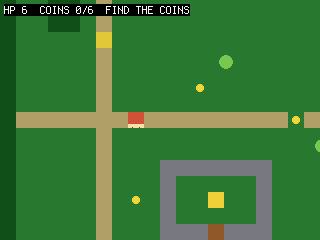 Everything becomes a goal: the NPC asks for all the coins; once you have them, talking
again opens the door (we rewrite those tiles from “door” to “path” so collision lets you
through); stepping on the shrine tile wins. A
Everything becomes a goal: the NPC asks for all the coins; once you have them, talking
again opens the door (we rewrite those tiles from “door” to “path” so collision lets you
through); stepping on the shrine tile wins. A st.stage field drives the dialog and the
door, and the mode gains a third value (WON). Note dialog_lines(st) now takes the state
object instead of reaching for globals — the payoff of keeping state in one place. You see:
talk → collect → unlock → reach the shrine → “QUEST COMPLETE”.
Try it: require defeating all slimes too before the door opens.
73 collapsed lines
# Quest -- step 8: a quest, a goal, and a win state (capstone).## What you learn: tying the systems into an actual game. The NPC gives an objective# (collect every coin); once you have them all, talking again OPENS the door (we# rewrite those tiles from "door" to "path", so collision lets you through); stepping# on the shrine tile wins. A small quest-stage variable drives the dialog text and# the door. This is the whole loop: talk -> collect -> unlock -> reach the goal.## The State object now carries the whole game: hp, coins, the quest stage, and the# mode (EXPLORE/DIALOG/WON). dialog_lines() TAKES the state (dialog_lines(st)) instead# of reaching for globals -- the tidy payoff of grouping state in one object.## New vs step 7: a quest stage, objective-driven dialog, opening the door by editing# tiles, a goal tile + WON state, and sound (a talk blip + a win chime).## BIG PICTURE: you've now hand-built an RPG -- map, camera, collision, animation,# items, NPC, combat, quest. You DON'T have to keep hand-coding maps like this: the# editor (editor/) lets you paint the map, place the hero/NPC/coins, and FLAG tiles# (solid/coin/goal) visually, then the picogame_scene loader builds the scene for# you -- the exact things this file does by hand become data. See tutorials/README.md# and examples/picogame_platformer_scene.py for a game whose level is loaded that way.## Run: python3 sim/run.py tutorials/03-quest/step8_quest.py --shot /tmp/q8.png
import boardimport terminalioimport picogame as pgimport picogame_gameimport picogame_inputimport picogame_clockimport picogame_animimport picogame_shapes as shpimport picogame_ui as ui
W, H = picogame_game.screen() # never hardcode: the same game runs at 240x240 and 640x480TILE = 16SPEED = 2MAP = [ "##############################", "#.....:......................#", "#.....:........*.............#", "#..##.:.............~~~~~~...#", "#..##.:.............~~~~~~...#", "#.....N.............~~~~~~...#", "#.....:.......E.....~~~~~~...#", "#.....:......................#", "#.....:.....*.........*......#", "#.....:......................#", "#:::::::P:::::::::*::::::::::#", "#.....:...................*..#", "#.....:.............E........#", "#.....:...WWWWWWW............#", "#.....:...W.....W......##....#", "#.....:.*.W..G..W......##....#", "#.....:...W.....W........E...#", "#.....:...WWWDWWW............#", "#.....:......................#", "##############################",]MAPCOLS, MAPROWS = 30, 20# tile values (frame index into the colour tileset; 0 = empty)GRASS, PATH, WATER, TREE, WALL, DOOR, GOAL = 1, 2, 3, 4, 5, 6, 7CHAR2TILE = {".": GRASS, "P": GRASS, "N": GRASS, "*": GRASS, "E": GRASS, ":": PATH, "~": WATER, "#": TREE, "W": WALL, "D": DOOR, "G": GOAL}TILE_RGB = [(40, 120, 50), # GRASS (180, 160, 110), # PATH (40, 90, 200), # WATER (20, 80, 30), # TREE (120, 120, 130), # WALL (150, 90, 40), # DOOR (240, 210, 60)] # GOALSOLID = (WATER, TREE, WALL, DOOR) # these tiles block movementDOWN, UP, LEFT, RIGHT = 0, 1, 2, 3DIR = {DOWN: (0, 1), UP: (0, -1), LEFT: (-1, 0), RIGHT: (1, 0)} # facing -> (dx, dy) stepFACING_ANIM = ("down", "up", "side", "side") # animation per facing (left/right share the side art)EXPLORE, DIALOG, WON = 0, 1, 2 # game modes (int constants, not strings)WALK_FPS = 8 # walk-animation speed (frames per second)MAX_HP = 65 collapsed lines
HURT_FRAMES = 40 # ~1.3s of mercy after a hit (at 30 fps)FLASH_FRAMES = 3 # how long the white hit-flash showsBACKGROUND = pg.rgb565(0, 0, 0)WHITE = pg.rgb565(255, 255, 255)NAVY = pg.rgb565(10, 10, 40)
# buffer_a/buffer_b = the engine's two shared render strips; immediate-mode draws# (the dialog/win box below) paint straight into buffer_ascene, buffer_a, buffer_b = picogame_game.setup(background=BACKGROUND)btn = picogame_input.Buttons()clock = picogame_clock.Clock(30)
# optional audio: a talk blip + a bright win chime (no asset needed). None if no backend.try: import picogame_audio audio = picogame_audio.Audio() snd_talk = picogame_audio.tone(520, 30) # short blip on dialog advance snd_win = picogame_audio.tone(880, 220) # bright chime on QUEST COMPLETEexcept Exception: audio = None snd_talk = snd_win = None
tileset = shp.tileset_colors(TILE, TILE, [pg.rgb565(*color) for color in TILE_RGB])world = pg.Tilemap(tileset, MAPCOLS, MAPROWS)START = (TILE, TILE)npc_x, npc_y = TILE, TILEcoin_spots, enemy_spots, door_tiles = [], [], []for tile_y in range(MAPROWS): for tile_x in range(MAPCOLS):8 collapsed lines
char = MAP[tile_y][tile_x] if tile_x < len(MAP[tile_y]) else "." world.set_tile(tile_x, tile_y, CHAR2TILE.get(char, GRASS)) if char == "P": START = (tile_x * TILE, tile_y * TILE) elif char == "N": npc_x, npc_y = tile_x * TILE, tile_y * TILE elif char == "*": coin_spots.append((tile_x * TILE, tile_y * TILE)) elif char == "E": enemy_spots.append((tile_x * TILE, tile_y * TILE)) elif char == "D": door_tiles.append((tile_x, tile_y))scene.add(world)
134 collapsed lines
coin_bitmap = shp.circle(8, pg.rgb565(245, 215, 60))coins = [pg.Sprite(coin_bitmap, x + 4, y + 4) for (x, y) in coin_spots]for coin in coins: scene.add(coin)slime_bitmap = shp.circle(14, pg.rgb565(120, 200, 80))enemies = [pg.Sprite(slime_bitmap, x + 1, y + 1) for (x, y) in enemy_spots]for enemy in enemies: scene.add(enemy)npc = pg.Sprite(shp.rect(TILE, TILE, pg.rgb565(230, 200, 60)), npc_x, npc_y)scene.add(npc)
# --- the hero: ASCII pixel art you can edit. '#' = a pixel, '.' = transparent. One# colour = a 1-bit silhouette; the FACING reads from the shape: DOWN has eyes, UP is# the back of the head, SIDE is a profile with a nose (LEFT = SIDE mirrored at runtime# with flip_x). Two poses per facing make the walk -- the legs scissor between A and B.HERO_COLOR = pg.rgb565(235, 90, 70)DOWN_A = [ "................", ".....####.......", "....######......", "....######......", "....#.##.#......", # eye gaps -> the face "....######......", ".....####.......", "...########.....", "..##########....", "..##########....", "..##########....", "...########.....", "....##..##......", "...###..##......", "..###...##......", # left foot forward "..##............",]DOWN_B = [ "................", ".....####.......", "....######......", "....######......", "....#.##.#......", "....######......", ".....####.......", "...########.....", "..##########....", "..##########....", "..##########....", "...########.....", "....##..##......", "....##..###.....", "....##...###....", # right foot forward "..........##....",]UP_A = [ "................", ".....####.......", "....######......", "....######......", "....######......", # solid head = the hero's back "....######......", ".....####.......", "...########.....", "..##########....", "..##########....", "..##########....", "...########.....", "....##..##......", "...###..##......", "..###...##......", "..##............",]UP_B = [ "................", ".....####.......", "....######......", "....######......", "....######......", "....######......", ".....####.......", "...########.....", "..##########....", "..##########....", "..##########....", "...########.....", "....##..##......", "....##..###.....", "....##...###....", "..........##....",]SIDE_A = [ "................", ".....####.......", "....#####.......", "....######......", "....#####.#.....", # nose nub -> faces right (flip_x -> left) "....######......", ".....####.......", "....######......", "....######.#....", # arm swung forward "....######.#....", "....######......", ".....####.......", "...##....##.....", # legs split "..##......##....", "..##......##....", "..#........#....",]SIDE_B = [ "................", ".....####.......", "....#####.......", "....######......", "....#####.#.....", "....######......", ".....####.......", "....######......", "....######......", # arm tucked in "....######......", "....######......", ".....####.......", ".....####.......", # legs pass under the body ".....####.......", "....##..##......", "....#....#......",]BM = {"down": [shp.from_mask(DOWN_A, HERO_COLOR), shp.from_mask(DOWN_B, HERO_COLOR)], "up": [shp.from_mask(UP_A, HERO_COLOR), shp.from_mask(UP_B, HERO_COLOR)], "side": [shp.from_mask(SIDE_A, HERO_COLOR), shp.from_mask(SIDE_B, HERO_COLOR)]}hero = pg.Sprite(BM["down"][0], START[0], START[1])walk = picogame_anim.AnimatedSprite(hero, { "down": (BM["down"], WALK_FPS, True), "up": (BM["up"], WALK_FPS, True), "side": (BM["side"], WALK_FPS, True)})scene.add(hero)hud = ui.SceneLabel(scene, pg, terminalio.FONT, 4, 4, WHITE, BACKGROUND)dialog = ui.TextBox(pg, terminalio.FONT, 8, H - 64, W - 16, 58, WHITE, NAVY, maxlines=4)NUMCOINS = len(coins)
class State: """The whole game's mutable state -- one object, passed where a function needs it. __init__ calls reset().""" def __init__(self): self.reset()
def reset(self): self.facing = DOWN self.coins = 0 self.hp = MAX_HP self.hurt_cooldown = 0 self.stage = 0 # 0 not started, 1 collecting, 2 door open self.mode = EXPLORE # EXPLORE / DIALOG / WON self.frame_count = 0 # frames elapsed (slimes chase every other frame) self.overlay_shown = False # draw dialog/win modal once, not every frame
24 collapsed lines
st = State()
def solid_at(pixel_x, pixel_y): tile_x, tile_y = pixel_x // TILE, pixel_y // TILE if tile_x < 0 or tile_x >= MAPCOLS or tile_y < 0 or tile_y >= MAPROWS: return True return world.get_tile(tile_x, tile_y) in SOLID
def can_walk(pixel_x, pixel_y): return not (solid_at(pixel_x + 2, pixel_y + 2) or solid_at(pixel_x + TILE - 3, pixel_y + 2) or solid_at(pixel_x + 2, pixel_y + TILE - 3) or solid_at(pixel_x + TILE - 3, pixel_y + TILE - 3))
def near(a, bx, by, d=TILE): # True if sprite a is within d px of the point (bx, by) on both axes (a box test) return abs(a.x - bx) < d and abs(a.y - by) < d
def camera_follow(): offset_x = max(W - MAPCOLS * TILE, min(0, W // 2 - (hero.x + TILE // 2))) offset_y = max(H - MAPROWS * TILE, min(0, H // 2 - (hero.y + TILE // 2))) scene.set_view(int(offset_x), int(offset_y))
def dialog_lines(st): if st.stage == 0: return ["Villager:", "Bring me all %d coins and" % NUMCOINS, "I'll open the shrine door.", "(press A)"] if st.stage == 1 and st.coins < NUMCOINS: return ["Villager:", "You have %d of %d coins." % (st.coins, NUMCOINS), "Keep looking!", "(press A)"] return ["Villager:", "The door is open.", "Seek the shrine within.", "(press A)"]
def open_door(): for (tile_x, tile_y) in door_tiles: world.set_tile(tile_x, tile_y, PATH) # door -> path (no longer SOLID) scene.invalidate()
camera_follow()def main(): # loop in a function -> its names are fast locals (see step 6) dt = 1 / 30 # seed the first frame; re-set from clock.tick() each loop while True: btn.poll() st.frame_count += 1
if st.mode == WON: if not st.overlay_shown: # draw ONCE -> no per-frame flicker scene.refresh() dialog.draw(scene.display, buffer_a, ["You reached the shrine!", "", "QUEST COMPLETE", "(press A)"]) if audio: audio.sfx(snd_win) # bright chime on the win st.overlay_shown = True if btn.just_pressed(btn.A): st.mode = EXPLORE scene.invalidate() clock.tick() continue
if st.mode == DIALOG: if not st.overlay_shown: # draw ONCE -> no per-frame flicker scene.refresh() dialog.draw(scene.display, buffer_a, dialog_lines(st)) st.overlay_shown = True if btn.just_pressed(btn.A) or btn.just_pressed(btn.B): if audio: audio.sfx(snd_talk) # blip on dialog advance if st.stage == 0: st.stage = 1 elif st.stage == 1 and st.coins >= NUMCOINS: st.stage = 2 open_door() st.mode = EXPLORE scene.invalidate()40 collapsed lines
clock.tick() continue
delta_x = btn.is_pressed(btn.RIGHT) - btn.is_pressed(btn.LEFT) delta_y = btn.is_pressed(btn.DOWN) - btn.is_pressed(btn.UP) if delta_x: st.facing = RIGHT if delta_x > 0 else LEFT elif delta_y: st.facing = DOWN if delta_y > 0 else UP hero.flip_x = (st.facing == LEFT) # mirror the side art for LEFT moved = False if delta_x and can_walk(hero.x + delta_x * SPEED, hero.y): hero.move(hero.x + delta_x * SPEED, hero.y); moved = True if delta_y and can_walk(hero.x, hero.y + delta_y * SPEED): hero.move(hero.x, hero.y + delta_y * SPEED); moved = True if moved: camera_follow() walk.play(FACING_ANIM[st.facing]) walk.tick(dt) else: hero.bitmap = BM[FACING_ANIM[st.facing]][0] # still: pose A of the current facing
if btn.just_pressed(btn.B): ddx, ddy = DIR[st.facing] ax, ay = hero.x + ddx * TILE, hero.y + ddy * TILE for enemy in enemies: if enemy.visible and abs(enemy.x - ax) < TILE and abs(enemy.y - ay) < TILE: enemy.visible = False
if st.frame_count % 2 == 0: for enemy in enemies: if not enemy.visible: continue # which way to the hero: -1, 0 or +1 per axis (a compact sign()) chase_dx = (hero.x > enemy.x) - (hero.x < enemy.x) chase_dy = (hero.y > enemy.y) - (hero.y < enemy.y) if chase_dx and can_walk(enemy.x + chase_dx, enemy.y): enemy.move(enemy.x + chase_dx, enemy.y) if chase_dy and can_walk(enemy.x, enemy.y + chase_dy): enemy.move(enemy.x, enemy.y + chase_dy)
if st.hurt_cooldown > 0: st.hurt_cooldown -= 1 if st.hurt_cooldown == HURT_FRAMES - FLASH_FRAMES: # end the hit-flash after 3 frames hero.flash = None else: for enemy in enemies: # 13px: slime radius (~7) + hero half-width (~8), i.e. they're touching if enemy.visible and near(enemy, hero.x, hero.y, 13): st.hp -= 1 st.hurt_cooldown = HURT_FRAMES hero.flash = WHITE # white hit-flash on damage if st.hp <= 0: st.hp = MAX_HP hero.move(START[0], START[1])7 collapsed lines
camera_follow() break
# pick up any coin we're standing on (within ~12px on both axes = close enough) for coin in coins: if coin.visible and abs(hero.x - coin.x) < 12 and abs(hero.y - coin.y) < 12: coin.visible = False st.coins += 1
# reach the shrine (goal tile) once the door is open if st.stage >= 2: # the tile under the hero's centre center_tile_x = (hero.x + TILE // 2) // TILE center_tile_y = (hero.y + TILE // 2) // TILE if world.get_tile(center_tile_x, center_tile_y) == GOAL: st.mode = WON st.overlay_shown = False
# Adjacency is enough here: A's other role (swing) is harmless beside the NPC. A game # where that clashes gates the talk on facing too (st.facing points at the NPC). if near(hero, npc.x, npc.y): hud.set("HP %d COINS %d/%d A:TALK" % (st.hp, st.coins, NUMCOINS)) if btn.just_pressed(btn.A): st.mode = DIALOG st.overlay_shown = False else: if st.stage < 1 or st.coins < NUMCOINS: objective = "FIND THE COINS" elif st.stage >= 2: objective = "DOOR OPEN!" else: objective = "RETURN TO NPC" hud.set("HP %d COINS %d/%d %s" % (st.hp, st.coins, NUMCOINS, objective))
scene.refresh() dt = clock.tick()
main()You now have a small playable RPG. You don’t have to keep hand-coding maps: the
web editor lets you paint this map, place the hero/NPC/coins, and flag tiles
(solid/coin/goal) visually, and picogame_scene loads it. Everything step8 does by hand
becomes data. See the scene format reference, and the bundled
examples/picogame_scene_example.py driver for a scene loaded from data.
Start your own game from here. You’ve built three games by hand — here’s the reusable shape to
start every new one from: the State + main() pattern (Game patterns) and a
ready-to-run game skeleton (Snippets, or open it in the
Playground). Drop your own art, tiles, and rules into that frame and
you’re off.