Drawing paths — which to use
Choose the path by when the content changes and whether it needs stored pixels:
- Use a retained
Scenefor a world that persists between frames. - Use
pg.render()for a one-off screen or a reserved HUD band. - Use
StripDrawwhen pixels can be regenerated instead of stored in a Canvas.
One compositor, two output backends
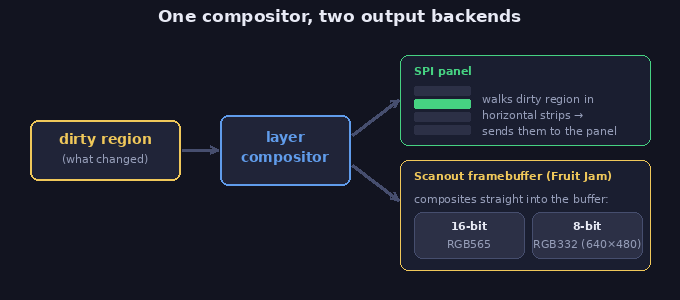
Section titled “One compositor, two output backends”Every draw uses the same layer compositor. On SPI targets, it walks each dirty region in horizontal
strips and sends them to the panel. On scanout targets such as Fruit Jam, it composites dirty
regions directly into the framebuffer. There the buffer’s colour depth decides the pixel format the
compositor writes: a 16-bit framebuffer takes RGB565 as-is, while an 8-bit one (the only depth picodvi
offers at 640×480) has each finished band quantized 565→332 as it’s published — you still author in
pg.rgb565(...) either way.
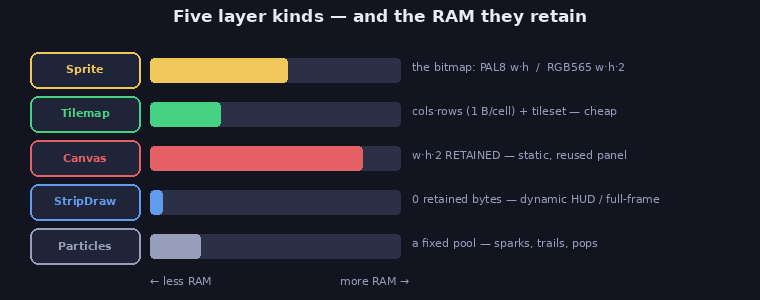
The layer choice determines how much additional pixel memory your game retains. A full-screen
StripDraw keeps no pixel buffer; a 320×240 RGB565 Canvas keeps about 150 KB. The scanout
framebuffer, where present, belongs to the display backend and is separate from both.
Two drivers (how drawing is triggered)
Section titled “Two drivers (how drawing is triggered)”| Driver | Use it for | Repaints |
|---|---|---|
scene.refresh() — retained, dirty-rect |
the persistent game world: add layers, mutate them, refresh. Camera (set_view), fixed (camera-independent) layers, reserved bands (top=/bottom=/left=/right=). |
only the dirty regions |
pg.render(display, items, buffer, x0,y0,x1,y1, *, background) — immediate |
a one-shot push, on demand, outside a scene: a HUD in a reserved band, a title / level-done / game-over screen. | when you call it |
Both drivers accept the same layer kinds: a pg.render list can hold Sprites, a StripDraw, a
Canvas, a Tilemap, or Particles, exactly like the scene.
Five layer kinds (what you draw) — and their RAM
Section titled “Five layer kinds (what you draw) — and their RAM”| Kind | RAM | Use for |
|---|---|---|
Sprite (wraps a Bitmap) |
the bitmap: PAL8 = w*h (1 B/px), RGB565 = w*h*2 |
moving objects, characters, bullets |
| Tilemap | cols*rows (1 B/cell) + the tileset |
big static / scrolling boards — very cheap per area |
| Canvas | w*h*2 retained |
a surface drawn occasionally and reused — a static panel, a dialog box |
| StripDraw | 0 retained pixel bytes (a view onto the current render target) | dynamic full-frame / strip content — sky, road, gradients, and dynamic HUD / screen text. Repaints every frame by default, or on demand (always_dirty=False + .invalidate()) for a buffer-less panel inside a live scene |
| Particles | a fixed pool | sparks, trails, pops |
Text rides on these
Section titled “Text rides on these”Canvas.text(x, y, s, fg, font, bg=None)composites glyphs in C straight into a surface: no glyph cache, no per-call Bitmap/Sprite. The surface can be a retained Canvas or aStripDrawview (which points at the live strip). The same one method covers both.picogame_font.render_text(...)rasterizes a string into a PAL8Bitmapyou show as a Sprite, good for moving text (floating damage numbers), where a sprite is what you want anyway.
Dynamic text drawn through a StripDraw view retains no glyph or panel bitmap. Its callback still
uses CPU whenever the region repaints.
Pseudo-3D rides on these too
Section titled “Pseudo-3D rides on these too”Canvas.mode7(...)fills the rows below a horizon with a Mode-7 perspective floor of a power-of-2 texture — draw it into aStripDrawview for a full-screen ground plane at 0 retained RAM (thepicogame_mode7.Camerahelper computes its fixed-point args from a camera pose).picogame_ray.Raycasterbuilds first-person walls the same way — a DDA cast per column, each wall afill_rectcolumn into aStripDrawview.
Both are the pseudo-3D case of “dynamic full-frame content”, so they live on StripDraw (never a 150 KB full-screen Canvas). See Pseudo-3D.
The decision matrix (HUDs, panels, screens)
Section titled “The decision matrix (HUDs, panels, screens)”| What | Right path | RAM |
|---|---|---|
| Dynamic, thin HUD (score / lives bar) | StripDraw (+ view.text), via scene or pg.render |
0 retained pixels |
| Static, large panel (side panel, title art, help text) | a Canvas drawn once (canvas.text), kept as a layer |
w*h*2 (justified — drawn once, reused, not re-rasterized) |
| Static panel + a few live numbers | static Canvas for the fixed part + a small StripDraw for the numbers |
small |
| A panel/dialog/menu inside a live scene (repaints only on change) | on-demand StripDraw (always_dirty=False, .invalidate() on change), added to the scene |
0 retained pixels |
| One-off screen (title / level-done / game-over) | pg.render([stripdraw]) — procedural bg + view.text, no scene needed |
0 retained pixels |
| Moving text (floating damage numbers) | picogame_font.render_text → Sprite |
text-sized bitmap |
The trap to avoid: a Canvas band for a dynamic HUD. A Canvas is retained w*h*2; for a
320×16 bar that is 10 KB that lives forever, and for a full-height side panel far more. A dynamic HUD
is dynamic strip content, so it belongs on a StripDraw, re-rasterized in C when
it changes. Reach for a Canvas only when the content is static (drawn once and reused).
A second trap: immediate pg.render over a live retained scene. The scene doesn’t know
render() changed the pixels, so its next refresh() repaints only its own dirty rects and leaves
stale fragments of your overlay on screen. If the rendered region overlaps the scene’s play rect
(pause screen, menu, cutscene, banner), call scene.invalidate() afterwards — or use
picogame_game.overlay(...), which is pg.render + scene.invalidate() in one call. HUD bands
outside the play rect (the top=/bottom= reserves) don’t need this: the scene never touches them.
A HUD without a retained panel buffer
Section titled “A HUD without a retained panel buffer”picogame_ui.HudBar already does this: it is a buffer-less StripDraw pushed via pg.render on
change. The same pattern by hand, for a reserved-band HUD:
scene, bufA, bufB = picogame_game.setup(background=BG, strip_h=BAR, top=BAR)hud = ui.HudBar(pg, picogame_game.display(), bufA, 0, 0, W, BAR, BG) # 0 retained RAMscore = hud.label(FONT, 4, 3, INK, "SCORE 0") # returns a text handle# ... on a change:score.set("SCORE %d" % pts)hud.draw() # re-composites in C, no cacheFormat on change, not per frame. .set() gates the redraw (it no-ops on an unchanged
string), but the "%"-formatting itself allocates a fresh string every call — done every frame
it is pure GC churn. Format at the place the value changes (as above), or if you poll in the
loop, guard with shadow ints: if pts != shown_pts: shown_pts = pts; score.set("SCORE %d" % pts).
For continuously moving values, quantize to the displayed unit first (seconds, percent).
Or fully by hand (e.g. a title screen, no scene, no buffers of your own):
def draw_title(view, vx, vy, vw, vh): view.clear(SKY) view.text(60 - vx, 90 - vy, "PRESS A", INK, FONT) # view-local = screen - (vx, vy)title = pg.StripDraw(draw_title, 0, 0, W, H)pg.render(picogame_game.display(), [title], bufA, 0, 0, W, H, background=SKY) # 0 retained pixelsview-local (0,0) is screen (vx, vy), so to draw at a screen position subtract (vx, vy).
On-demand repaint: a buffer-less panel inside a live scene
Section titled “On-demand repaint: a buffer-less panel inside a live scene”A StripDraw defaults to repainting every frame (always_dirty=True), right for a sky/road that
changes constantly. But construct it with always_dirty=False and it repaints only when you call
.invalidate() (or another dirty layer overlaps it). That gives a panel that lives inside a
scene** (a dialog box, status panel, or menu) which sits idle (no re-rasterize, no re-push) until its
content actually changes, then repaints once. It is the buffer-less alternative to a retained Canvas
for content that is mostly static but must update occasionally.
panel = pg.StripDraw(draw_panel, x, y, w, h, always_dirty=False) # idle until invalidatedscene.add(panel, fixed=True)# ... when the text changes:panel.invalidate() # repaints once on the next refreshThis is how picogame_ui.SceneBox and SceneMenu work: a buffer-less in-scene dialog or menu that
repaints on show/hide/set_line, not every frame.
Half-resolution art + power-of-two upscale (a RAM technique)
Section titled “Half-resolution art + power-of-two upscale (a RAM technique)”Store big artwork at 1/2 or 1/4 size and show it through a Sprite with scale = 2 (or 4, 8).
The bitmap shrinks quadratically while the screen area stays the same:
| 320×240 PAL8 background | RAM |
|---|---|
| stored 1:1 | 75.0 KB |
stored half size, scale = 2 |
18.8 KB |
stored quarter size, scale = 4 |
4.7 KB |
On an RP2040 (≈ 25–40 KB of free heap) a full-screen bitmap background is impossible at 1:1 and comfortable at 4× — this technique is what makes it fit.
It is cheap at runtime only at power-of-two scales, and the two formats differ: opaque PAL8 sprites take a dedicated fast path at any power of two (2, 4, 8, 16 …), opaque RGB565 only at exactly 2× (and only when the source data is 2-byte aligned). Measured at ~1.5× a generic scaled blit — each source row is rasterized once and its repeats are copied. Everything else — RGB565 at 4×, scale 3, 1.5, a tweened 0.8→1.5 — takes the generic scaler, which is fine for small sprites but expensive for full-width layers. Transparent sprites also take the generic path, so keep the big scaled layers opaque.
The look is chunky pixels — on this hardware that is an aesthetic, not a compromise (see
Making it fun). Pictor’s parallax runs this way: 640 px-wide bands stored
at half size, shown at scale = 2, saving ~23 KB against 1:1 art.
Rules of thumb
Section titled “Rules of thumb”- Moving object → Sprite. Big board → Tilemap. Dynamic full-frame/strip or HUD → StripDraw. Occasional static panel → Canvas (drawn once).
- A dynamic HUD never needs a
Canvas. If you typedpg.Canvas(W, BAR, ...)for a HUD, switch to aStripDraw. - A
Canvasis justified only when the content is static and reused; then the buffer pays for itself by not re-rasterizing each frame. - Both
scene.refresh()andpg.render()take every layer kind, so choose the driver by when it should repaint (every dirty refresh vs. on demand), not by what you need to draw.
See also
Section titled “See also”- Fighting a
MemoryError? See Memory & RAM for the budget, how to measure it, and the arena fix. - Exact signatures for
Canvas,StripDraw,pg.renderandSprite: the Reference. - Ready-made HUD / dialog / menu widgets built on these paths: Text & UI.
- Backing a
Canvaswith reused memory instead of a fresh buffer: Saving & memory (picogame_arena).